On this page
Plugins are the usual reason nopCommerce upgrades slip. StorePulse checks the versions each installed plugin declares, plugins that depend on missing plugins, and known nopCommerce bugs for your version. Its Upgrade readiness page runs the same check against the version you plan to move to and, for 5.00, lists what else in the store needs work.
nopCommerce 5.00 admin
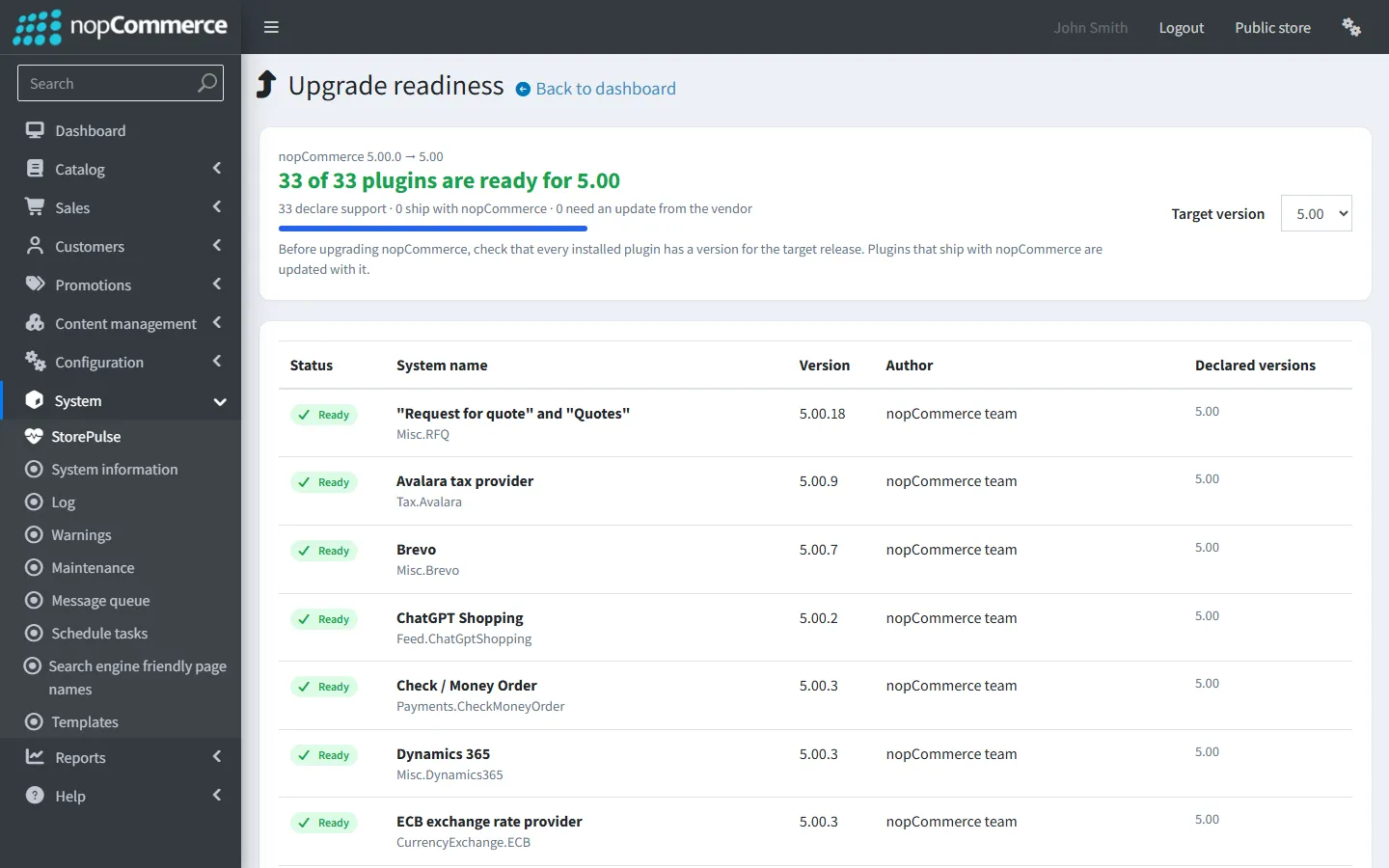
Plugins that support this version
StorePulse check PLUGIN-002
What StorePulse checks
Installed plugins whose plugin.json doesn’t list the running nopCommerce version, such as 4.90.
Why it matters
nopCommerce won’t load a plugin that doesn’t declare support. One that slips through may call methods that no longer exist.
Common causes
- nopCommerce was upgraded and the plugin wasn’t.
- The vendor hasn’t released a build for this version yet.
How to fix it
- Open Configuration → Local plugins, filter to installed plugins and note each plugin’s version.
- Get the build for your nopCommerce version from each vendor, or plan a replacement.
- Before an upgrade, open StorePulse → Upgrade readiness and pick the target version.
Missing plugin dependencies
StorePulse check PLUGIN-003
What StorePulse checks
Installed plugins that list another plugin in their plugin.json DependsOn field when that plugin isn’t installed.
Why it matters
The plugin can fail as soon as it tries to use the missing one.
Common causes
- The required plugin was uninstalled or its folder deleted.
How to fix it
- Open the plugin’s details in Configuration → Local plugins to see its dependencies.
- Install the missing plugin, or uninstall the plugin that needs it.
Known nopCommerce bugs in your version
StorePulse check PLUGIN-006
What StorePulse checks
Your exact nopCommerce version against a short list of confirmed nopCommerce bugs that StorePulse ships with. Nothing is downloaded. The list currently covers scheduled task runs being skipped (#8105, fixed in 4.90.4) and start-up exceptions being ignored (#8271, fixed in 4.90.7).
Why it matters
Some bugs only show up under load or after a restart. Knowing they exist saves hours of debugging.
Common causes
- Your version is older than the patch release that fixed the bug.
How to fix it
- Open the linked GitHub issue in StorePulse to read what it affects.
- Plan an update to the latest patch of your version line. Patch releases within a line, such as 4.90.4 to 4.90.8, keep plugin compatibility.
How nopCommerce decides whether a plugin is compatible
Each plugin folder has a plugin.json descriptor with a SupportedVersions list, such as [ "4.90" ]. When the running version isn’t in the list, nopCommerce marks the plugin as not compatible and doesn’t load it. It also refuses plugins whose main assembly is missing and plugins that would load a different version of a library already in use.
Changing SupportedVersions by hand isn’t an upgrade. The plugin must be rebuilt against the target version’s libraries (.NET 9 for 4.80 and 4.90, .NET 10 for 5.00), and any changed APIs fixed.
Check plugins before you upgrade
StorePulse’s Upgrade readiness page lists every installed plugin with the versions it declares, and marks which ones are ready for the version you pick. Plugins that ship with nopCommerce are marked separately, because they are upgraded with it.
For the rest of the process, read how to upgrade nopCommerce without breaking plugins.
Before you upgrade to nopCommerce 5.00
nopCommerce 5.00 changes more than a usual release, so on 4.80 and 4.90 the Upgrade readiness page adds a “Before you upgrade to 5.00” list when you pick 5.00. It reads your store when the page opens, changes nothing and doesn’t affect the health score. Each item says what it found, why it matters on 5.00 and what to do, with a link to the admin page.
- Forums, news and polls: they move into the Misc.Forums, Misc.News and Misc.Polls plugins. The content stays in the database but only shows once you install the plugin.
- The Manual payment method: it no longer ships with 5.00, so choose another one first.
- Card details stored in orders: counted, never read. Nothing in 5.00 uses them, and stored CVV codes are never allowed under card-industry rules.
- Email templates with %Order.CustomValues%: 5.00 replaces it with four new tokens and doesn’t update your templates.
- Plugin code that uses parts of nopCommerce 5.00 changes: AutoMapper, RemotePost.Post(), the attribute PictureId fields and the forum, news and poll classes. StorePulse reads this from the plugin files without loading them.
- Your theme: themes don’t declare supported versions, and 5.00 changes storefront views.
- .NET 10 on the server: 5.00 needs ASP.NET Core Runtime 10.0.12 or later.
- Old attribute picture links: some stores still have links the 4.70 upgrade didn’t clear. The 5.00 upgrade copies them again, so pictures can show twice or come back after being removed.
Frequently asked questions
Can I use a 4.80 plugin on nopCommerce 4.90?
Not without a 4.90 build. Both versions run on .NET 9, but nopCommerce checks the declared version and APIs changed between releases. Ask the vendor for a 4.90 build.
Will my 4.90 plugins work on nopCommerce 5.0?
Not without 5.00 builds. 5.00 runs on .NET 10, and plugins that use AutoMapper, RemotePost.Post() or the removed attribute PictureId fields also need code changes. On 4.90, StorePulse’s Upgrade readiness page shows which installed plugins declare 5.00 and which use those APIs.
Check your store with StorePulse
StorePulse is a free, read-only nopCommerce plugin from Cartenvo. It runs these checks and 49 more in a few seconds, explains each result and links back to the guide for it. It works on nopCommerce 4.80 and 4.90 and 5.00 and sends no data outside your server.
Rather have someone fix it for you? Email contact@cartenvo.com with what StorePulse found and we will tell you what it takes.
If this keeps happening, we can fix it
If plugins or the theme aren’t ready for the version you need, we can carry out an upgrade readiness review and port what needs porting.