On this page
nopCommerce keeps several tables that grow forever unless someone clears them. On a busy store they reach millions of rows, which slows the admin area and makes every backup larger. StorePulse counts each one with a limit, so even very large tables don’t slow the scan.
nopCommerce 5.00 admin
System log size
StorePulse check DB-004
What StorePulse checks
How many entries are in the system log. StorePulse warns at 100,000 by default.
Why it matters
A huge log makes System → Log slow, takes space in every backup and usually means an error is repeating.
Common causes
- One error repeating on every request or every task run.
- The “Clear log” task is disabled, as it is after installation.
- Plugins writing Information or Debug entries.
How to fix it
- Fix the most frequent errors first (see the error log guide).
- Use “Clear log” in System → Log when you no longer need the entries. It deletes every entry.
- To keep recent entries, set commonsettings.clearlogolderthandays to a number of days in All settings and enable the “Clear log” task, or use the SQL below.
Activity log size
StorePulse check DB-005
What StorePulse checks
How many entries are in the activity log. StorePulse warns at 500,000 by default.
Why it matters
The activity log records admin and customer actions. With many types enabled it grows fast, and nopCommerce has no built-in task to trim it.
Common causes
- Public store activity types are enabled, such as viewing products or adding to the cart.
- No one has cleared it since the store launched.
How to fix it
- Open Customers → Activity Types and untick the types you don’t need.
- Use “Clear all” in Customers → Activity log if you don’t need the history. It deletes every entry.
- To keep recent entries, delete older rows in batches with the SQL below.
Old sent emails
StorePulse check DB-006
What StorePulse checks
Emails sent more than 30 days ago that are still in the message queue. StorePulse warns at 50,000 by default.
Why it matters
nopCommerce keeps every sent email, with its full body, in the QueuedEmail table. It becomes one of the largest tables on busy stores.
Common causes
- Nothing removes sent emails automatically.
How to fix it
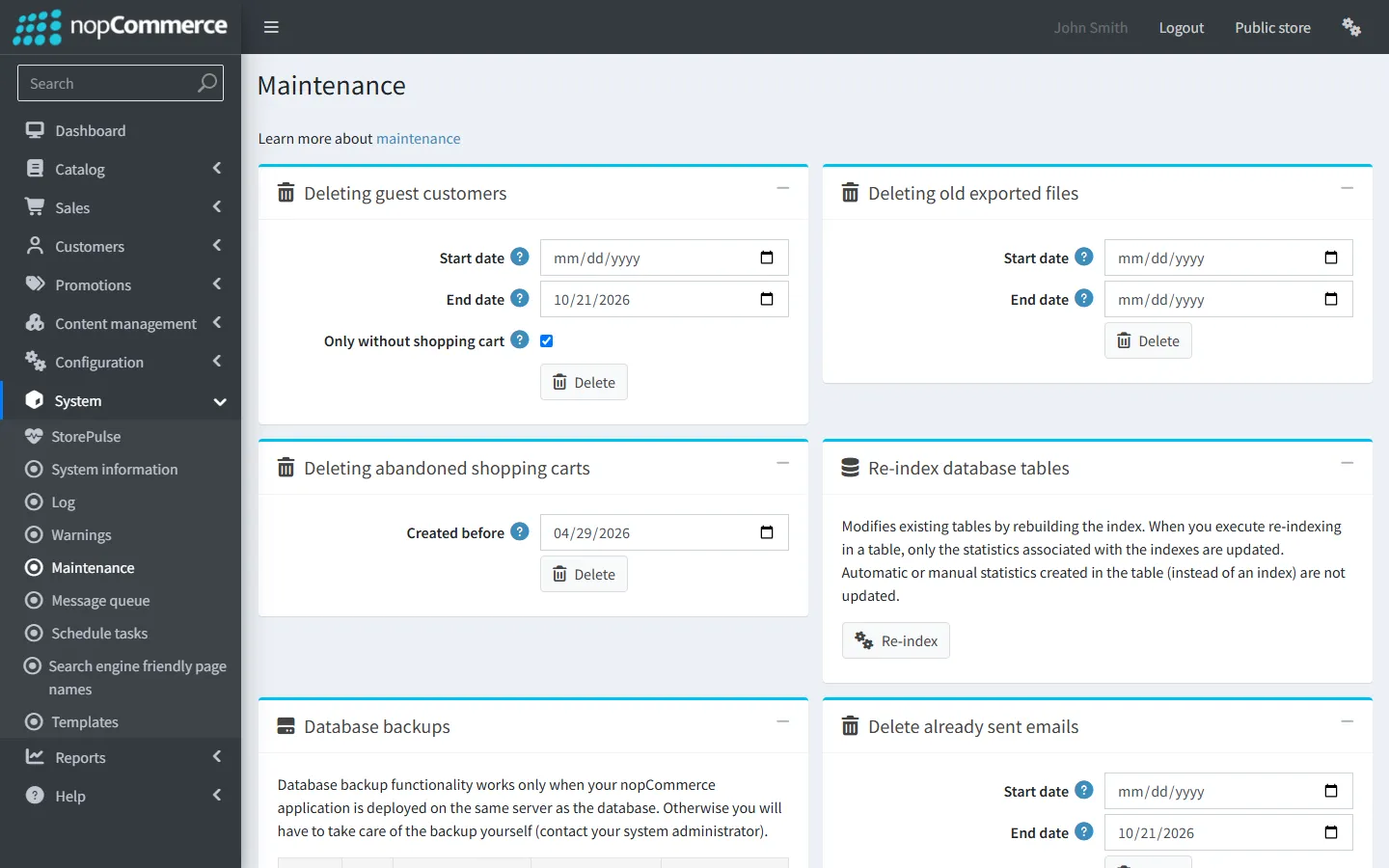
- Open System → Maintenance and find “Delete already sent emails”.
- Leave the start date empty, set the end date to 30 days ago and delete.
- On very large queues, use the batched SQL below instead.
Old shopping carts
StorePulse check DB-007
What StorePulse checks
Shopping cart and wishlist items not changed for more than 90 days. StorePulse warns at 50,000 by default.
Why it matters
Abandoned carts take space and stop the “Delete guests” task removing the guests they belong to.
Common causes
- Guests and customers leave items behind, and nopCommerce doesn’t remove them on its own.
How to fix it
- Open System → Maintenance and find “Deleting abandoned shopping carts”.
- Choose a date 90 days ago and delete.
- Run the “Delete guests” task afterwards, so guests whose carts were removed are deleted too.
Find the largest tables
Run one of these read-only queries to see where the space goes before deleting anything.
SQL Server · 15 largest tables
SELECT TOP 15 t.name AS table_name,
  SUM(CASE WHEN ps.index_id IN (0, 1) THEN ps.row_count ELSE 0 END) AS row_count,
  SUM(ps.reserved_page_count) * 8 / 1024 AS reserved_mb
FROM sys.dm_db_partition_stats ps
JOIN sys.tables t ON t.object_id = ps.object_id
GROUP BY t.name
ORDER BY reserved_mb DESC;
PostgreSQL · 15 largest tables
SELECT relname AS table_name,
  n_live_tup AS approx_rows,
  pg_size_pretty(pg_total_relation_size(relid)) AS total_size
FROM pg_stat_user_tables
ORDER BY pg_total_relation_size(relid) DESC
LIMIT 15;
Delete old rows in batches
Deleting millions of rows in one statement can lock the table and fill the transaction log. These scripts delete 10,000 rows at a time. Change the table, date column and number of days to match what you are cleaning: Log and ActivityLog use CreatedOnUtc; sent emails use SentOnUtc in QueuedEmail with SentOnUtc IS NOT NULL.
SQL Server · delete log entries older than 30 days
DECLARE @cutoff datetime2 = DATEADD(day, -30, SYSUTCDATETIME());
WHILE 1 = 1
BEGIN
  DELETE TOP (10000) FROM [Log] WHERE CreatedOnUtc < @cutoff;
  IF @@ROWCOUNT = 0 BREAK;
END
PostgreSQL · delete log entries older than 30 days (repeat until it deletes 0)
DELETE FROM "Log"
WHERE "Id" IN (
  SELECT "Id" FROM "Log"
  WHERE "CreatedOnUtc" < now() AT TIME ZONE 'utc' - interval '30 days'
  LIMIT 10000
);
SQL Server · delete sent emails older than 30 days
DECLARE @cutoff datetime2 = DATEADD(day, -30, SYSUTCDATETIME());
WHILE 1 = 1
BEGIN
  DELETE TOP (10000) FROM QueuedEmail WHERE SentOnUtc IS NOT NULL AND SentOnUtc < @cutoff;
  IF @@ROWCOUNT = 0 BREAK;
END
After a big clean-up
Deleting rows frees space inside the database file but doesn’t shrink the file. On SQL Server, rebuild the indexes of the cleaned tables (System → Maintenance has a re-index tool) and only shrink the file if you need the disk space back. On PostgreSQL, autovacuum reclaims the space over time; VACUUM (ANALYZE) on the cleaned table speeds it up.
Frequently asked questions
Which nopCommerce tables grow the most?
Usually Log, ActivityLog, QueuedEmail, Customer (guests), GenericAttribute and ShoppingCartItem. Run the largest-tables query above to see your own.
Is it safe to clear the nopCommerce log?
Yes. The log is only used for troubleshooting. Read and fix the errors you care about first, because the entries are gone afterwards.
Check your store with StorePulse
StorePulse is a free, read-only nopCommerce plugin from Cartenvo. It runs these checks and 48 more in a few seconds, explains each result and links back to the guide for it. It works on nopCommerce 4.80 and 4.90 and 5.00 and sends no data outside your server.
Rather have someone fix it for you? Email contact@cartenvo.com with what StorePulse found and we will tell you what it takes.
If this keeps happening, we can fix it
If the database keeps growing, or pages stay slow after a clean-up, ask about database performance tuning.