- Plugin
- Paid
Advanced Search & Autocomplete for nopCommerce
A nopCommerce search plugin that turns the search box into a federated search panel. As shoppers type, it shows matching products, categories, brands, FAQs, articles and promotions together, inspired by Algolia’s federated search for ecommerce. It runs on nopCommerce’s own search, or on Algolia if you have an account.
- Platform
- nopCommerce 4.90 · .NET 9
- Release
- Version 1.15
- Price
- $19.00 per store
- Algolia
- Optional
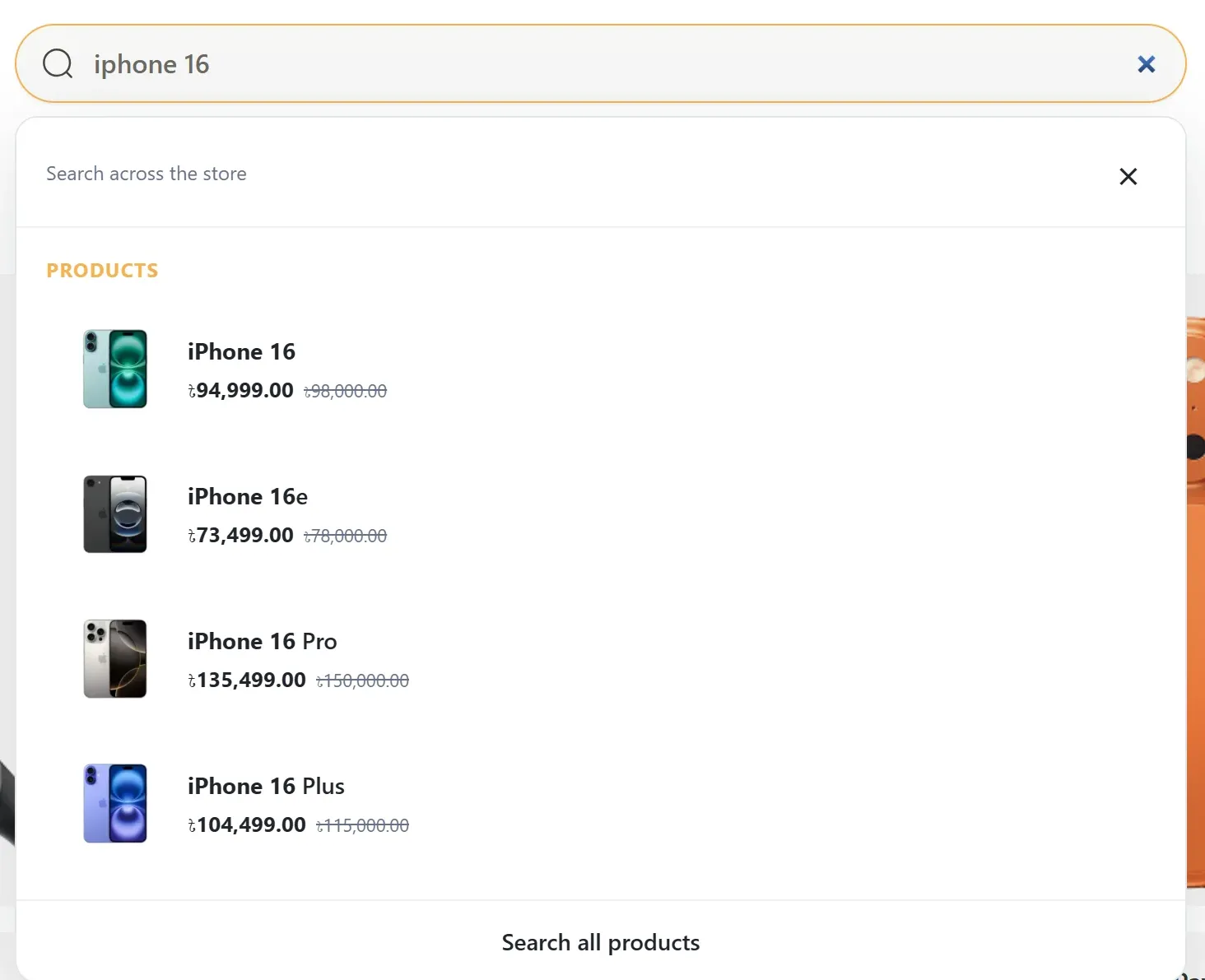
Search panel while typing
What it changes, and what stays nopCommerce
Cartenvo Advanced Search improves
- The suggestions panel under your existing search box, on desktop and mobile
- Keyword matching: words in any order, across names, SKU, part numbers, GTIN and tags
- Optionally, which products the results page finds and how they rank
- Insight into what shoppers search for and can’t find
nopCommerce still handles
- Your theme’s search box and its look
- The search results page layout, filters, sorting and paging
- Prices, tax, currency and customer permissions, which stay nopCommerce’s
- Your catalog data: nothing is copied out unless you choose Algolia
Search experience
Autocomplete that helps before, during and after typing
Shoppers who search are ready to buy, but a plain product list loses them on vague or misspelled queries. The panel gives them more than one way to the right page.
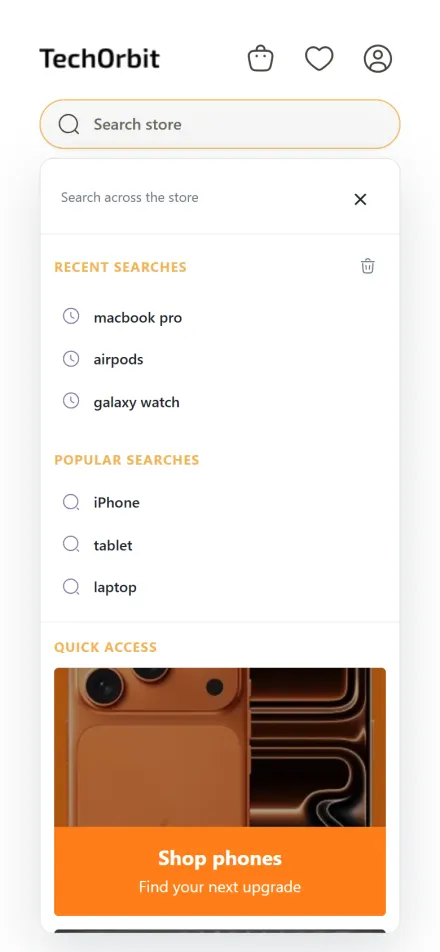
1 Before typing
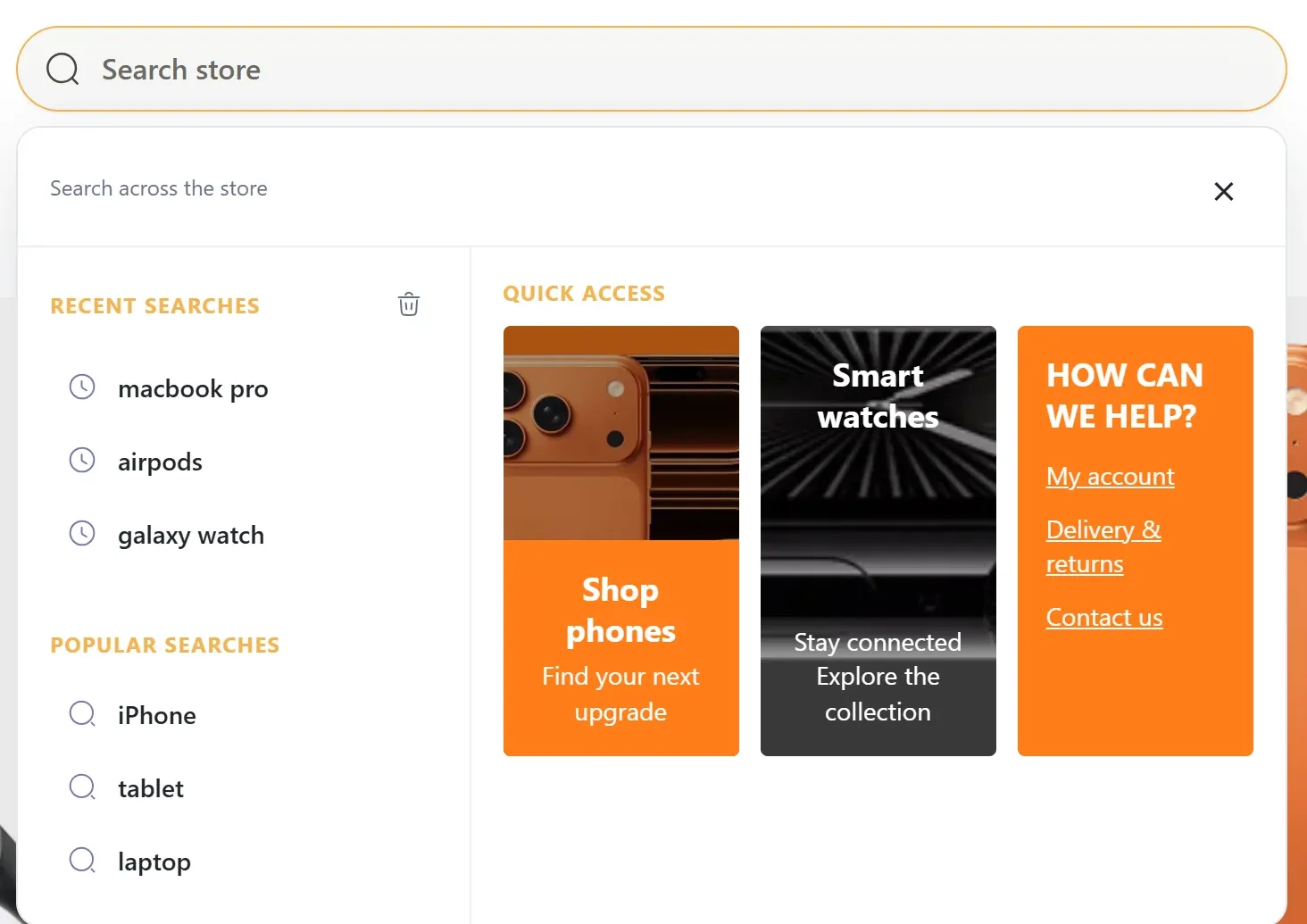
- Recent searches
- The shopper’s last searches, stored only in their own browser for 30 days. One click clears them.
- Popular searches
- Terms you choose, such as “iPhone”, “tablet” or “laptop”, in the order you set.
- Quick-access cards
- Promotions, new collections, promo codes or help links, designed in admin with your own images.
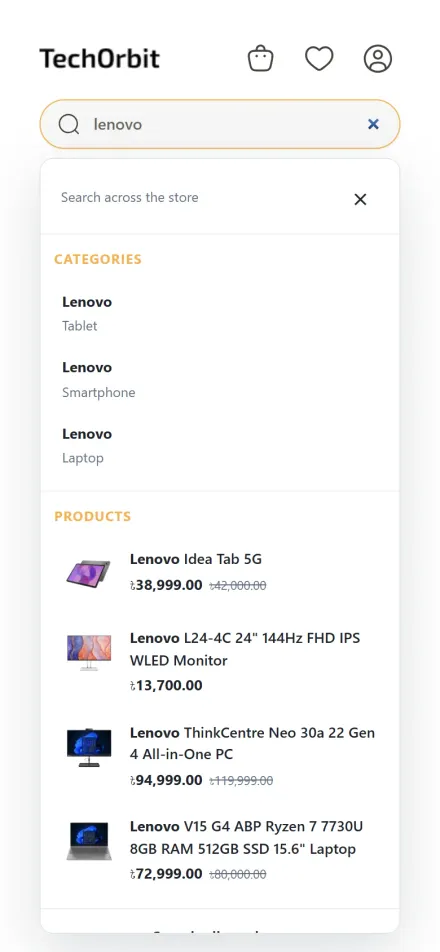
2 While typing
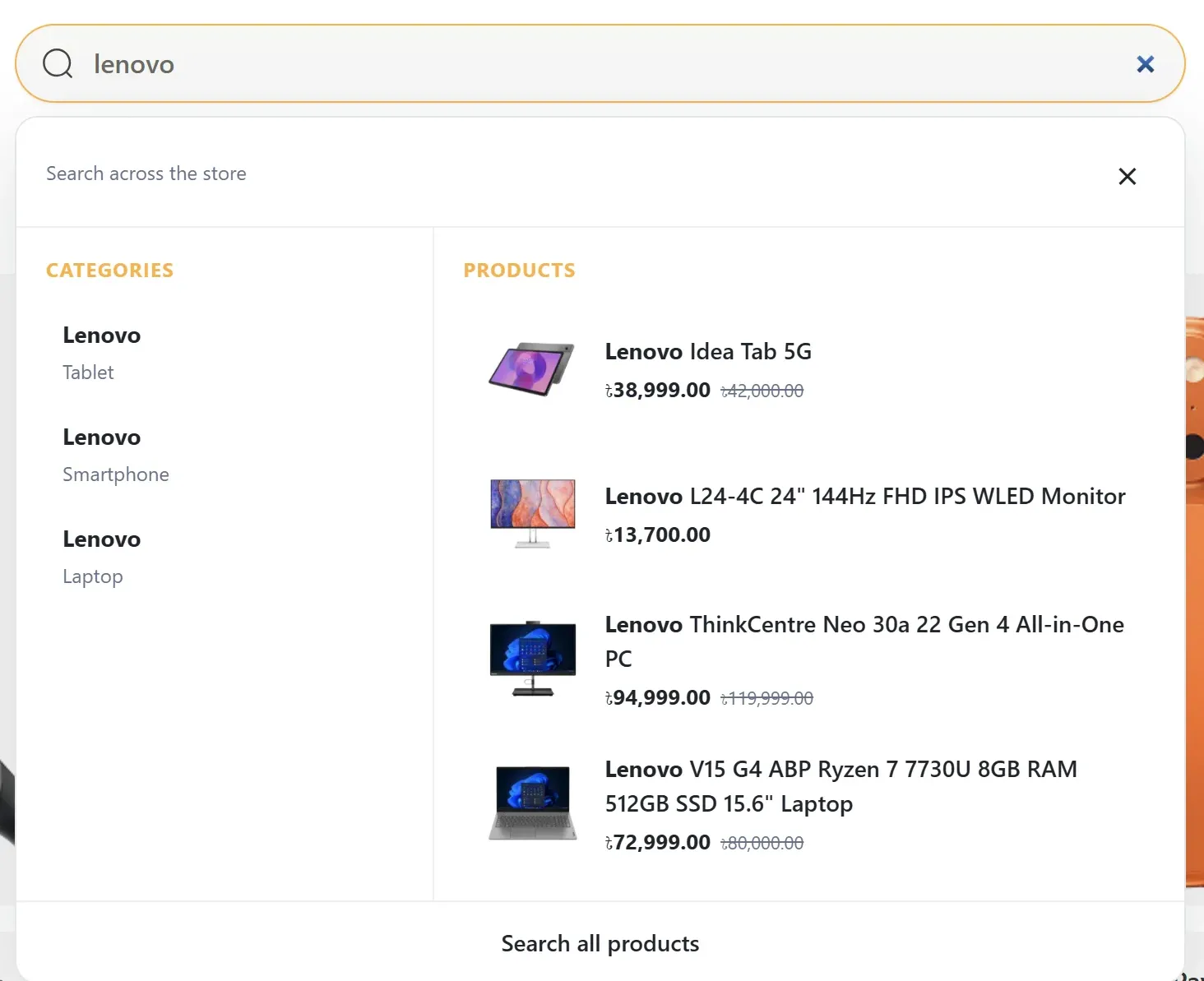
- Categories with their path
- Three “Lenovo” categories under Tablet, Smartphone and Laptop stay distinct, so shoppers land in the right place.
- Live product previews
- Images, names, sale prices and old prices from nopCommerce, in the shopper’s currency and tax setting.
- Brands, FAQs, suggestions and articles
- Switch these sections on to answer “how long is delivery” or “where is my order” before the shopper leaves the search box.
Better product search, even without Algolia
In default mode the plugin replaces nopCommerce’s literal phrase match with word-by-word matching and ranking.
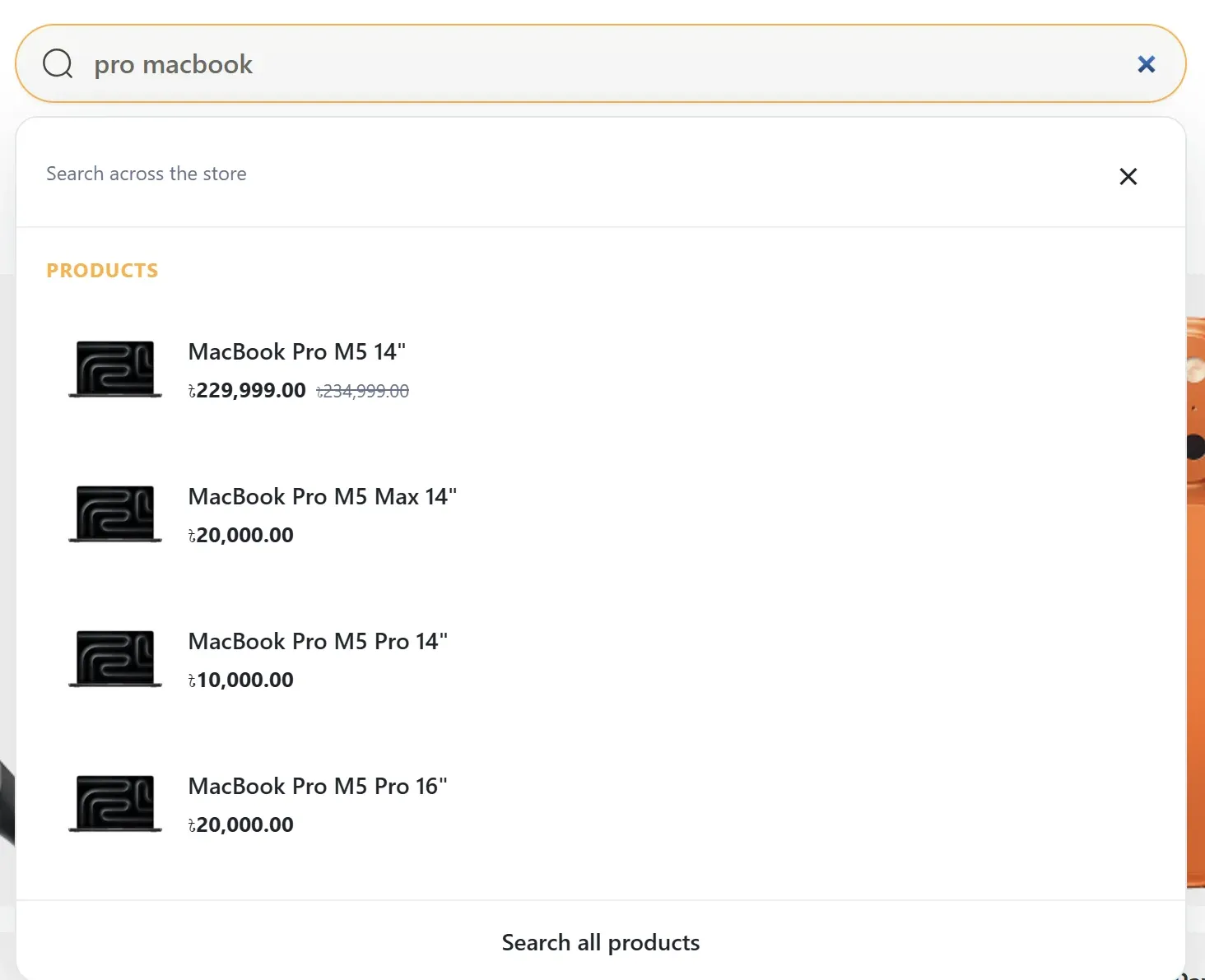
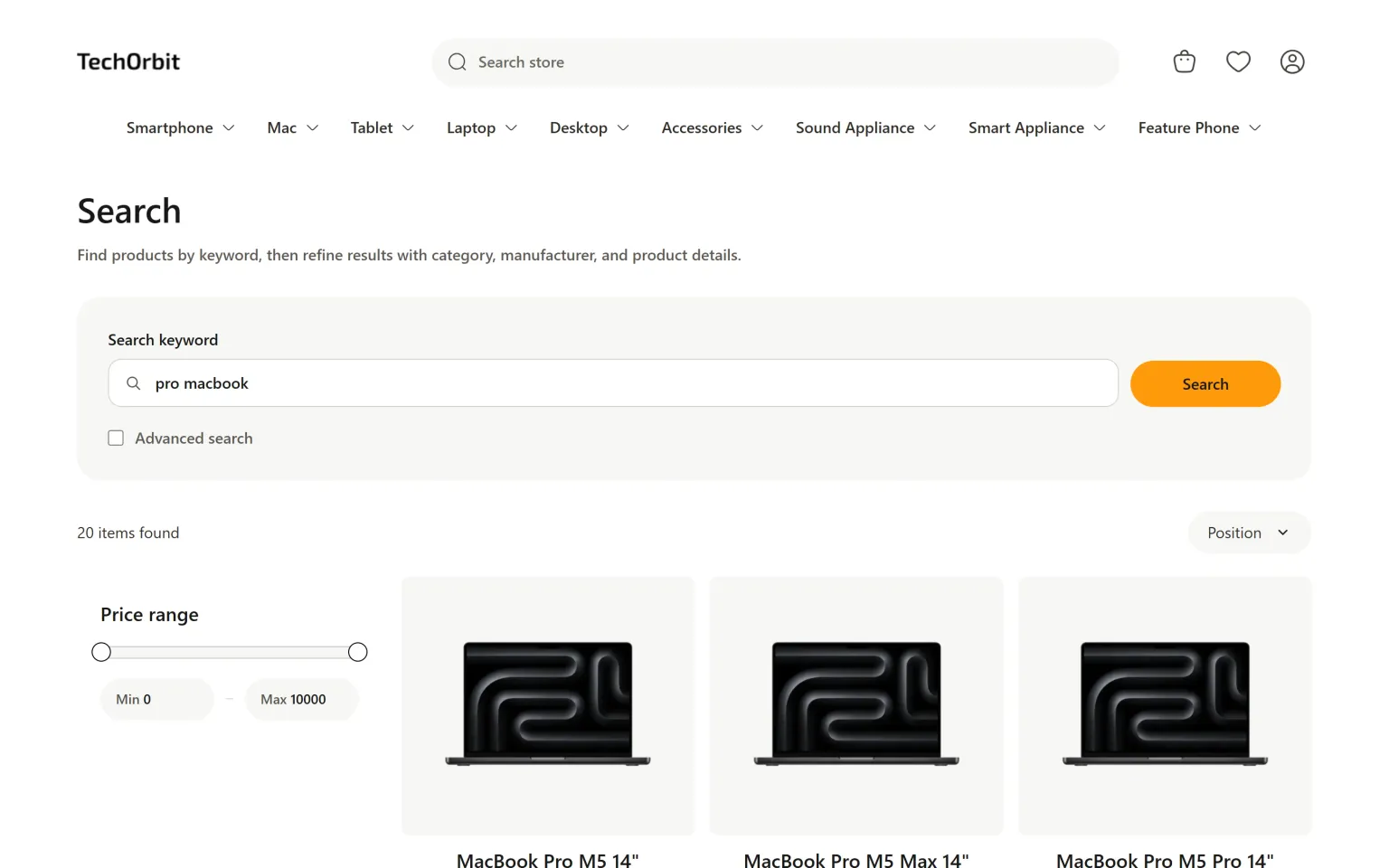
Any word order
“pro macbook” finds “MacBook Pro M5 14”. Standard nopCommerce search needs the words in the product name’s order.
Exact matches first
Results are ranked: exact names, then names that start with the query, then names containing every word, then SKU, tag and description matches.
Codes shoppers copy
SKU, manufacturer part number and GTIN are matched too, for shoppers searching with a code from a box or invoice.
Made for phones too
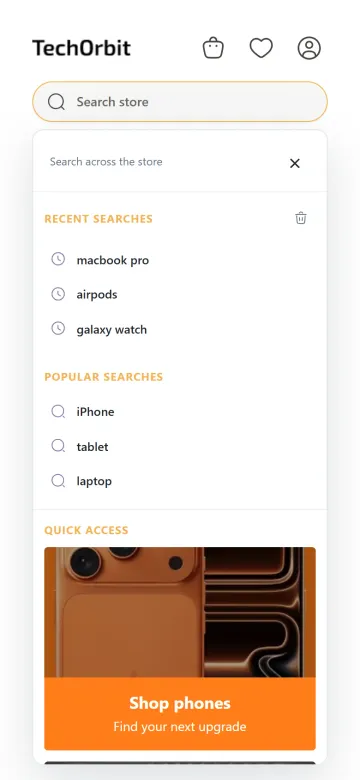
On a phone the panel takes the full width of the screen and stacks its sections into one column, so categories, products and cards stay easy to tap. Arrow keys, Enter, Escape and Tab work on desktop.
Inspired by Algolia
Federated search, built for nopCommerce
Federated search shows results from several sources in one panel instead of a single list of products. Algolia’s advanced federated search experience for ecommerce is the best-known example: recent and popular searches with quick-access promotions before typing, then suggestions, categories and products as the shopper types.
Cartenvo Advanced Search brings that design to nopCommerce as a ready plugin. You get the same two-column panel and the same three states, without writing Autocomplete.js code, and you can run it on nopCommerce’s own search instead of Algolia.
Cartenvo Advanced Search is an independent plugin by Cartenvo. It is not made, supported or endorsed by Algolia. Algolia is a trademark of its owner.
| Section | Appears | Content from |
|---|---|---|
| Recent searches | Before typing | The shopper’s own browser |
| Popular searches | Before typing | Terms you choose, or Algolia |
| Quick access | Before typing | Cards you design |
| Suggestions | While typing | Your terms, category and brand names |
| Categories | While typing | Live catalog |
| Brands | While typing | Live manufacturers |
| Help & FAQs | While typing | Answers you write |
| Products | While typing | Live catalog with prices |
| Articles | While typing | Blog posts |
| Explore categories | No results | Categories you pick |
Search providers
Use Algolia, or no external service at all
Pick a provider in admin. The panel looks and works the same with either, and you can switch at any time.
Default nopCommerce search
Searches your live catalog directly. No account, API keys, external server or extra fees. This is how the screenshots on this page were taken.
- Works the moment you install it
- Live stock, prices and permissions
- Improved ranking and word-order matching
Algolia (optional)
Connect your own Algolia account for Algolia’s relevance and typo tolerance. The plugin creates and synchronizes the indexes for you.
- Automatic catalog synchronization per store and language
- All sections in one multi-index request per keystroke
- Falls back to default search if Algolia is unavailable
Algolia needs your own Algolia account and keys, and Algolia bills its subscription and usage separately. API keys are encrypted and used only from your server. Algolia synchronization has not yet been validated against a live Algolia account.
The search results page, ranked better (optional)
Pressing Enter or “Search all products” opens nopCommerce’s normal search results page. Turn on Also improve the search results page and the plugin finds and ranks the products on that page too, with the same matching as the panel or with Algolia.
nopCommerce keeps that page’s layout, filters, sorting and paging. The plugin does not add facets or filters there. In the screenshot, “pro macbook” returns 20 products, where standard search finds none.
Search results page
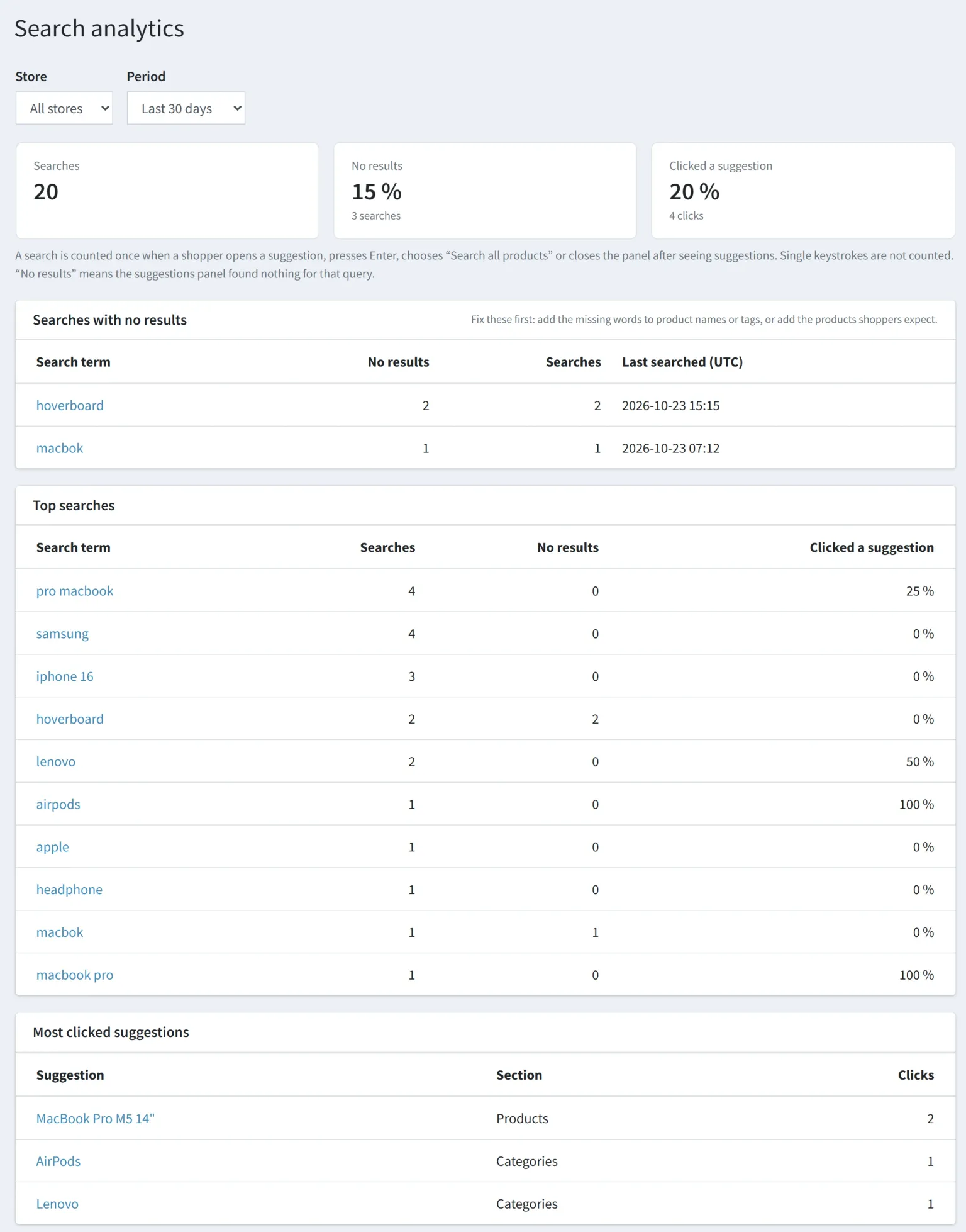
Search analytics
See what shoppers search for and can’t find
A Search analytics page in nopCommerce admin, per store, for the last 7, 30, 90 or 365 days.
- Searches with no results
- The terms to fix first. Add the missing words to product names or tags, or stock what shoppers expect.
- Top searches and click rate
- What shoppers look for most, and how often a suggestion was good enough to click.
- Most clicked suggestions
- Which products, categories and cards the panel actually sends shoppers to.
A search is counted once, when the shopper opens a suggestion, presses Enter or closes the panel after seeing results. No customer, session or IP data is stored, and data older than a year is deleted.
nopCommerce admin · Search analytics
Everything managed from nopCommerce admin
Find it under Plugins → Cartenvo Advanced Search, with Configuration and Search analytics.
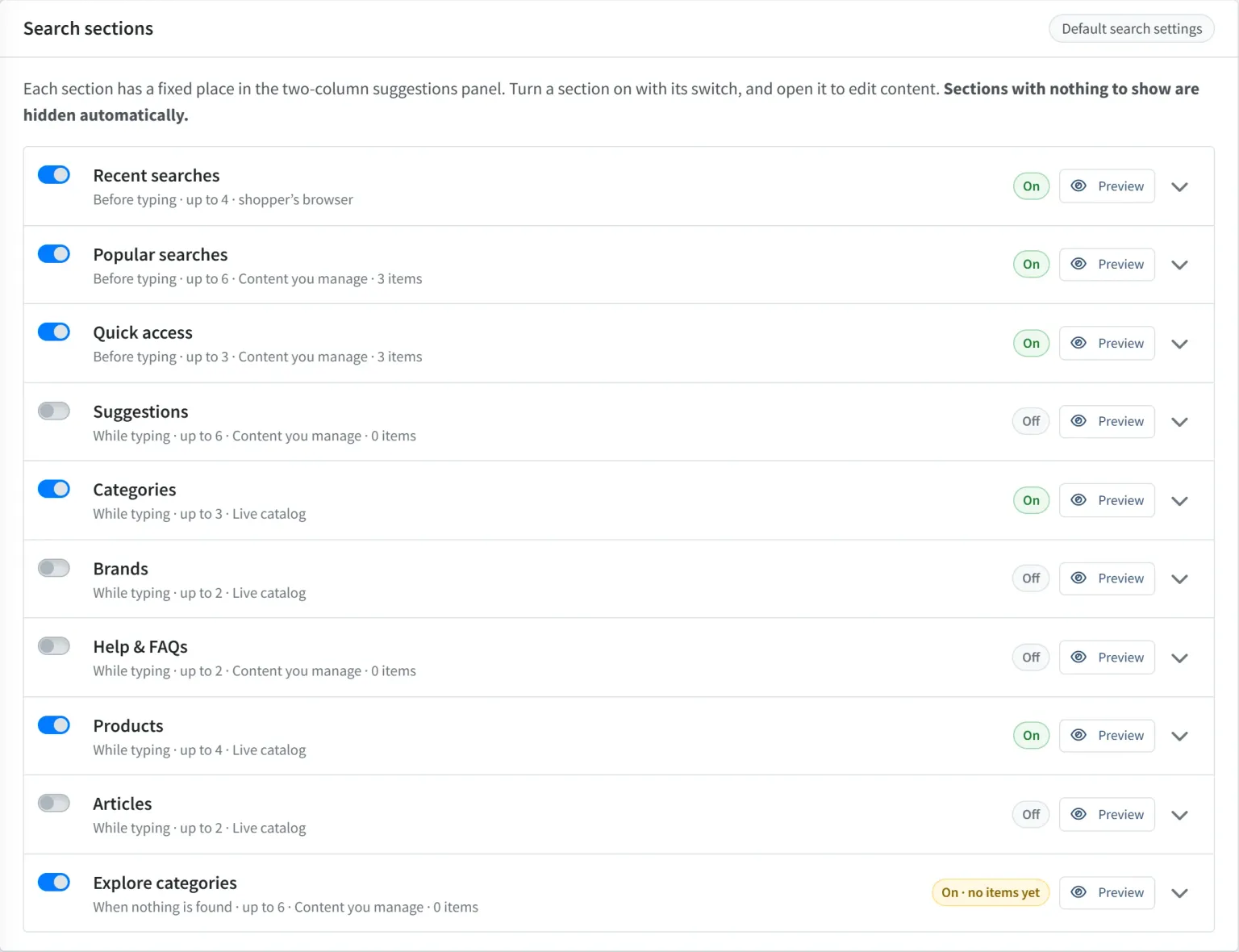
- Switch each of the ten sections on or off and set its heading and item limit
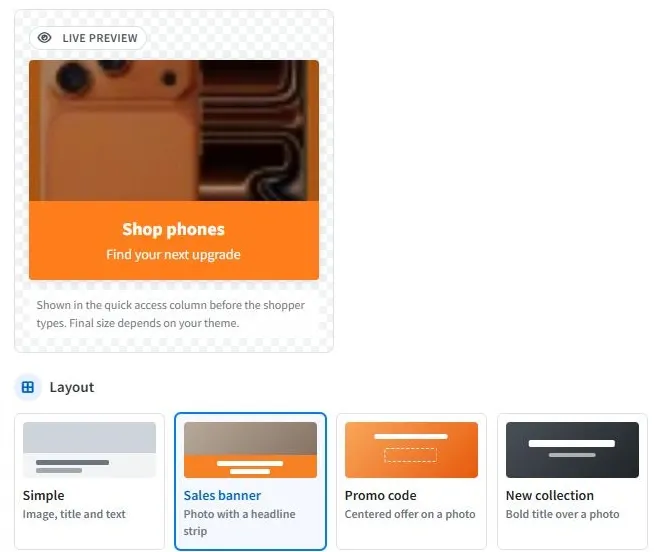
- Add popular terms, suggestions, FAQs and quick-access cards with images and links
- Design cards from six layouts with a live preview
- Save a separate configuration per store, and target items to a language
- Preview where any section sits in the panel
Each section has a fixed position in the panel. Sections with nothing to show are hidden automatically.
Compare
How it differs from other nopCommerce search plugins
Most nopCommerce search plugins connect a search engine and show product previews. Cartenvo Advanced Search is built around the search panel instead.
| Typical search-engine plugin | Cartenvo Advanced Search | |
|---|---|---|
| What appears while typing | Product previews | Products, categories with their path, brands, suggestions, FAQs and articles |
| Before typing | Usually nothing | Recent searches, popular searches and quick-access cards |
| External service | Required: Algolia, Elasticsearch, Solr, Typesense or similar | None needed. Algolia is optional |
| Results page | Often replaced, with the engine’s own facets and filters | nopCommerce’s page kept. Optional ranking only |
| Search analytics | In the engine’s dashboard, if offered | Inside nopCommerce admin, with no-result searches |
| Merchant content in search | Rarely | FAQs, help links, promotions and promo codes |
Choose a search-engine plugin when
you need faceted filters on the results page, merchandising rules or full-text search over a very large catalog, and you’re ready to run or pay for the engine.
Choose Cartenvo Advanced Search when
you want shoppers to reach the right category, product or help page from the search box, without new infrastructure. You can also use it alongside an engine plugin that keeps the results page.
Pricing
One low price per store
A one-time licence with a year of updates. No subscription.
What’s included
Cartenvo Advanced Search
The Advanced Search & Autocomplete with Algolia plugin for nopCommerce 4.90, with default search and the Algolia provider.
Search analytics
No-result searches, top searches and click rates in nopCommerce admin.
Translations
Panel texts in 15 languages, applied to the languages your store has installed.
12 months of updates and support
New releases for nopCommerce 4.90 and answers to questions about installing and configuring the plugin.
Not included
- Installation, theme changes and custom development
- Algolia subscription and usage charges, if you use Algolia
- Facets and filters on the results page
- Hosting and your nopCommerce server
Building an electronics store? The TechOrbit theme includes Cartenvo Advanced Search. Read the licence and refund terms.
One-time price
USD
$19.00per store licence
No subscription. Algolia is optional and billed by Algolia if you use it.
- One production store, plus its staging and development environments
- 12 months of updates and 12 months of product support
- Default nopCommerce search and Algolia provider both included
- Your purchased version keeps working after updates and support end
Purchasing opens soon
Online checkout isn’t available yet, so there’s nothing to pay today. Try the panel on the live demo store in the meantime.
Compatibility
Check the fit before you buy
The practical details for your store and team.
- nopCommerce
- Version 4.90 on .NET 9. Earlier and later versions are not supported.
- Themes
- Attaches to any search box that submits to the store’s search page, including the default theme. Other search boxes can be added with a CSS selector. The theme must render nopCommerce’s standard end-of-page widget zone.
- Multi-store and languages
- Each store can have its own configuration. Curated items can target one language or all. Product visibility, store mappings and access control are respected.
- Other search plugins
- The results-page ranking is a switch. Leave it off to keep another plugin, such as an Elasticsearch plugin, as your store’s search provider. Turn off that plugin’s own dropdown to avoid two panels.
- Accessibility
- Keyboard navigation with arrows, Enter, Escape and Tab, combobox and listbox semantics and live result counts. The original search form still works without JavaScript.
- Privacy
- Recent searches stay in the shopper’s browser. Analytics store daily totals per term, with no customer, session or IP data.
- Installation
- Upload the ZIP through nopCommerce’s Upload plugin or theme, install, and restart. No core or theme files are changed.
Questions
nopCommerce search plugin FAQ
Something else to check? Ask Cartenvo.
Do I need an Algolia account?
No. The plugin works with nopCommerce’s default search and your live catalog, with no external account or server. Algolia is optional: connect your own Algolia account when you want Algolia’s relevance and typo tolerance. Algolia bills its subscription and usage separately.
Does it change the search results page and its filters?
Not by default. The plugin improves the suggestions panel under the search box. Pressing Enter or choosing “Search all products” opens nopCommerce’s normal search results page. If you turn on “Also improve the search results page”, the plugin finds and ranks the products on that page, but nopCommerce keeps the page layout, filters, sorting and paging. It does not add facets or filters.
Is this a replacement for Elasticsearch or full-text search?
No. It is not a search engine. In default mode it improves nopCommerce’s keyword matching: words match in any order across names, SKU, part numbers, GTIN and tags, and results are ranked. For engine-level relevance and typo tolerance, use the Algolia provider.
How is it inspired by Algolia federated search?
Algolia publishes an “advanced federated search experience for ecommerce” example: one two-column panel with recent searches, popular searches and quick-access promotions before typing, then suggestions, categories and products while typing. Cartenvo Advanced Search brings that pattern to nopCommerce and lets you run it on Algolia or on nopCommerce’s own search. It is an independent plugin, not made or endorsed by Algolia.
Which nopCommerce versions are supported?
nopCommerce 4.90 on .NET 9. Other versions are not supported.
Will it work with my theme?
It attaches to any search box that submits to your store’s search page, so it works with the default theme and most third-party themes without template changes. For a theme that searches without a form, enter its search box selector in the settings. The theme must render nopCommerce’s standard widget zone at the end of the page.
What does search analytics record?
Daily totals per store and search term: how often a term was searched, how often it found nothing, and which suggestions shoppers clicked. It stores no customer, session or IP data, skips terms that look like email addresses or phone numbers, and deletes data after 365 days. You can turn it off.
Which languages does the panel support?
The shopper-facing texts ship in English, German, French, Spanish, Italian, Dutch, Portuguese, Polish, Turkish, Russian, Arabic, Bengali, Hindi, Simplified Chinese and Japanese. You can change any text in nopCommerce’s language resources.
Is it included with the TechOrbit theme?
Yes. TechOrbit buyers already get Cartenvo Advanced Search in the theme package and don’t need to buy it separately.
How do I pay and download it?
Checkout is handled by Paddle, our reseller, which accepts the payment and issues the receipt. After the payment is confirmed, sign in to My purchases with the same email address to download the plugin ZIP.
Give your nopCommerce search box a federated panel.
Try it on the demo store, then add it to your own store for $19.00.