TechOrbit · nopCommerce theme
An electronics storefront built for your next sale.
TechOrbit is a premium nopCommerce theme by Cartenvo for stores selling electronics, computers, smartphones and accessories. It comes with a homepage you manage from admin and Cartenvo Advanced Search to guide shoppers to the right product.
- Platform
- nopCommerce 4.90 · .NET 9
- Release
- Version 4.90.2
- Price
- $149.00 introductory
TechOrbit demo store
Product tour
See the store your customers will use
Screenshots from the TechOrbit demo store, with a real electronics catalog. Choose a view to see what each part does.
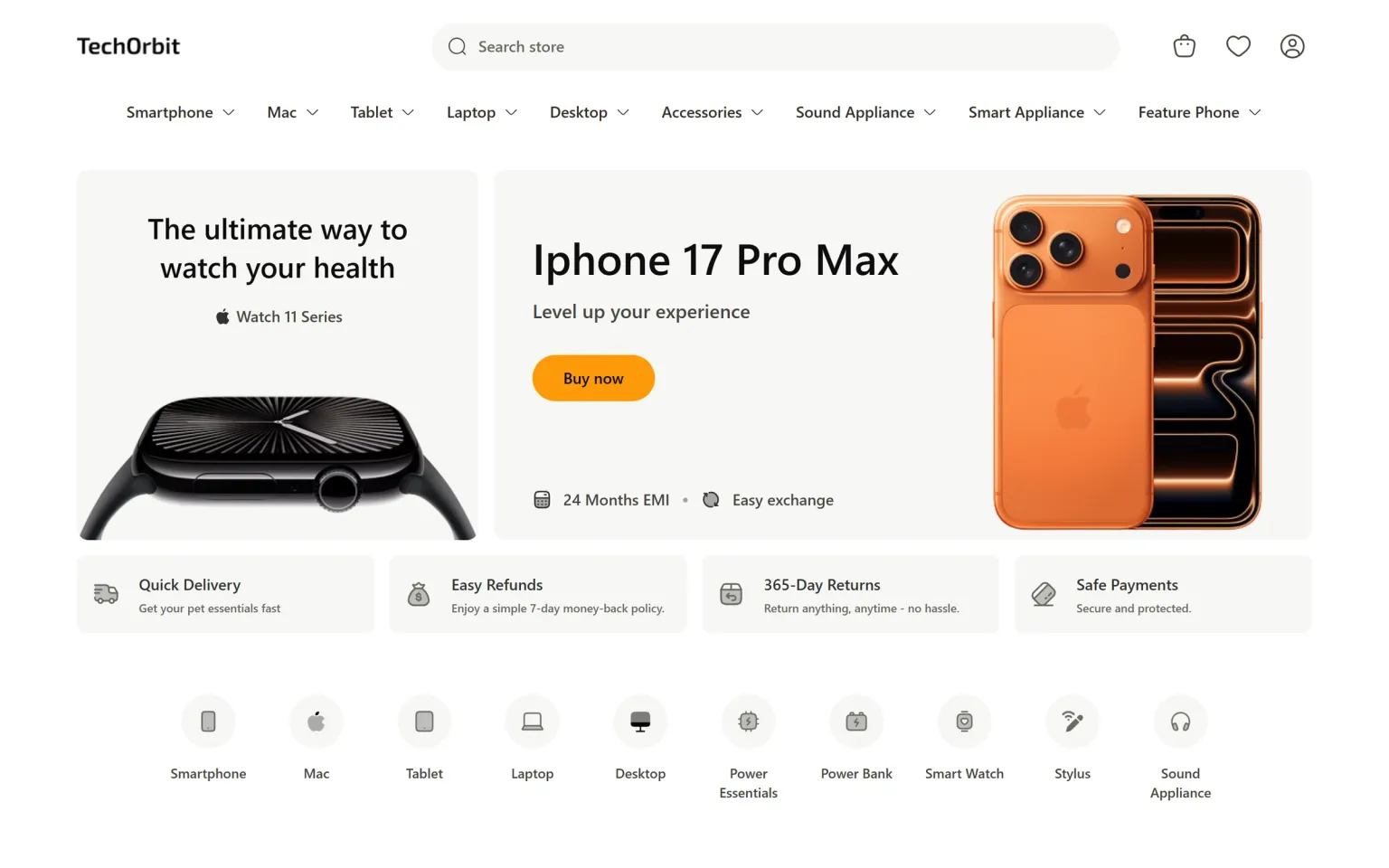
Lead with the products you want to sell
The homepage opens with two large feature cards, then category shortcuts, popular items, new arrivals, promo cards and special offers. Products are pulled from your catalog with their live prices and discounts.
- Two hero cards with your own images, headlines and buttons
- Icon shortcuts to your main categories
- Product grids show sale prices and discount badges
TechOrbit demo store
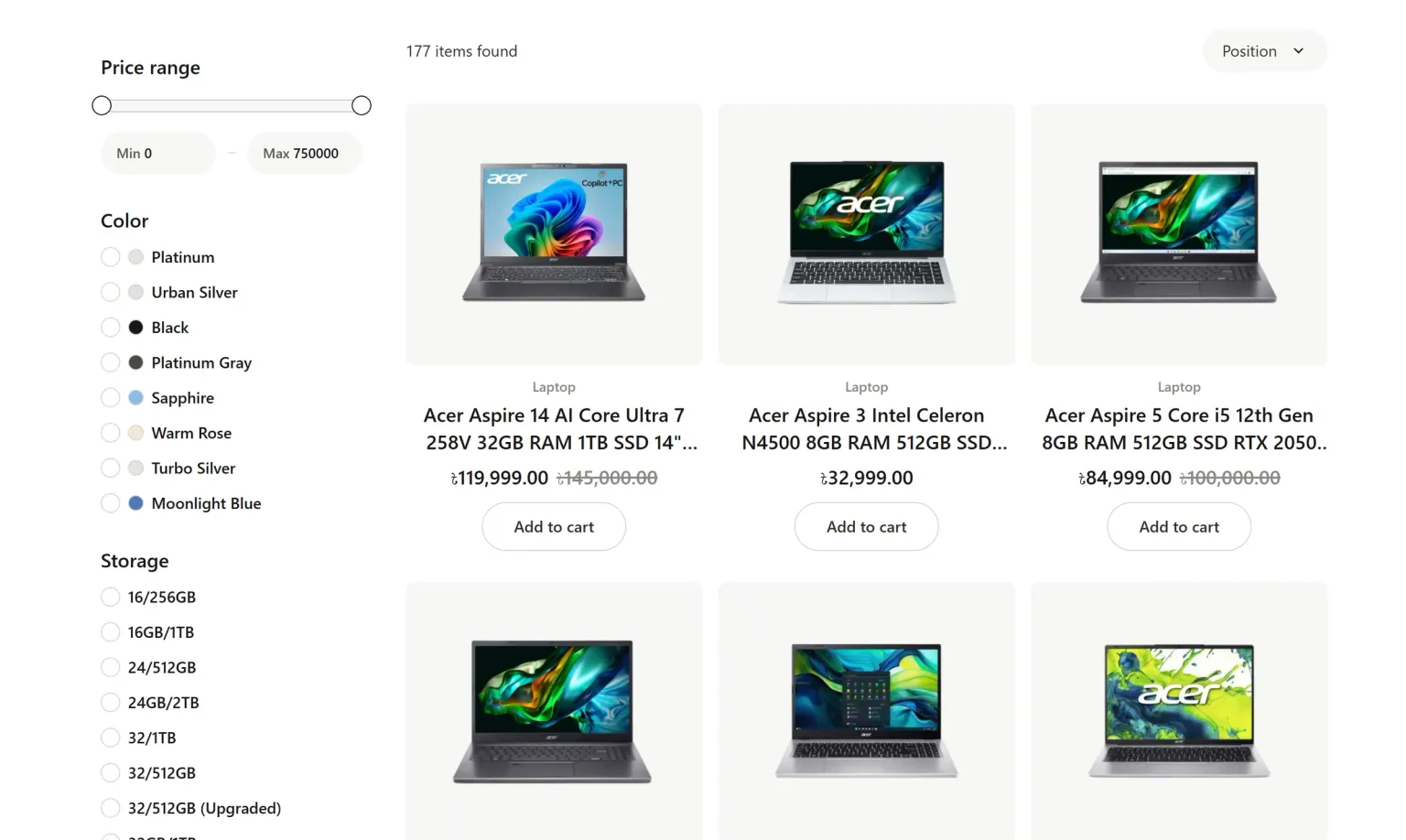
Let shoppers narrow a large range quickly
Category pages put subcategory links above the grid and nopCommerce filters beside it, so a shopper can go from “Laptops” to a price range, colour and storage size without leaving the page.
- Price range slider plus specification filters such as colour and storage
- Result count and sort order above the grid
- Clear product cards with brand, title, price and Add to cart
TechOrbit demo store
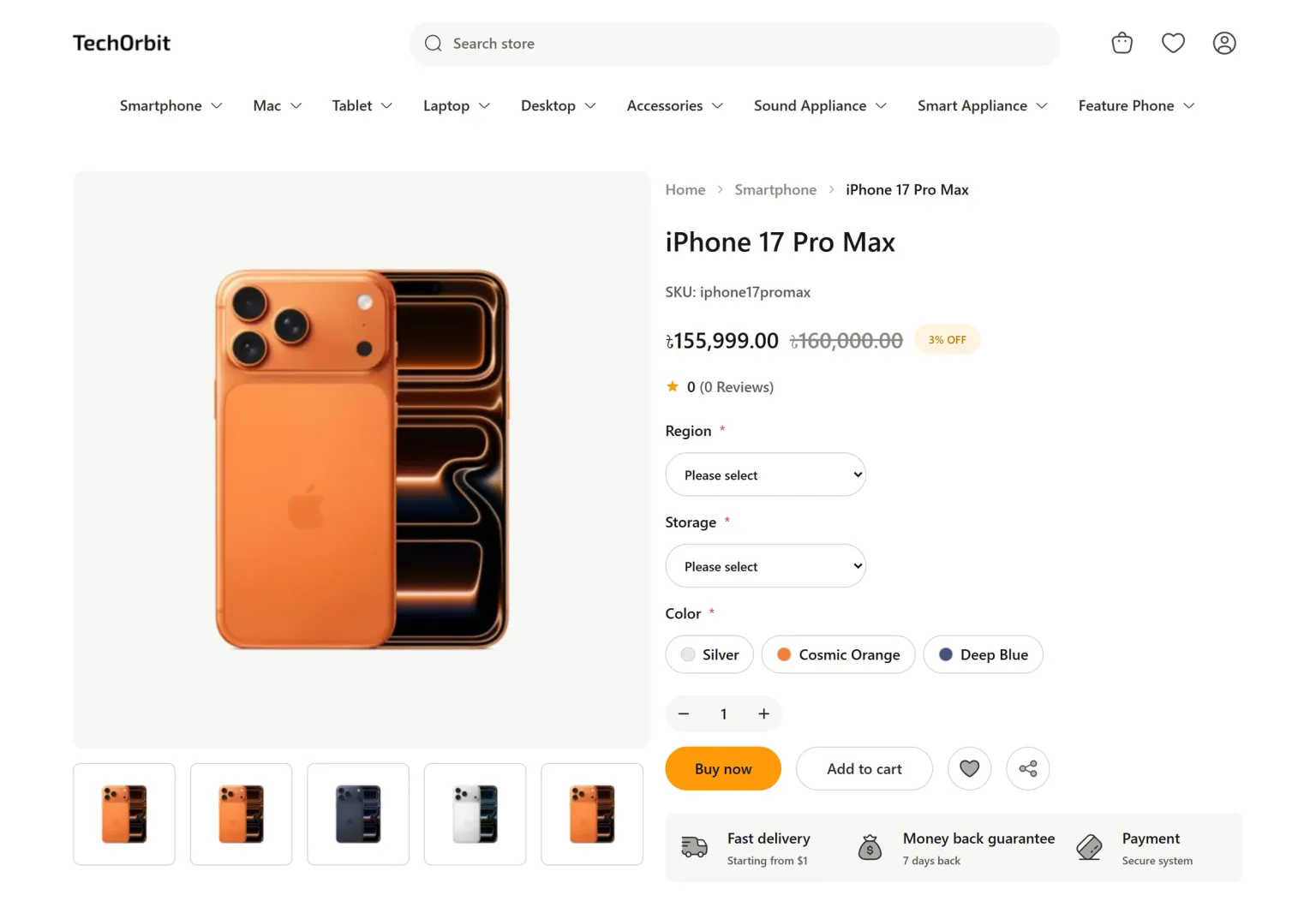
Product pages built for configurable electronics
Variant choices, colour swatches and the price sit beside a large image gallery. Buy now and Add to cart stay in one row, and specifications sit in their own tab below.
- Image gallery with thumbnails
- Required attributes such as region and storage, plus colour swatches
- Specification, description and review tabs
TechOrbit demo store
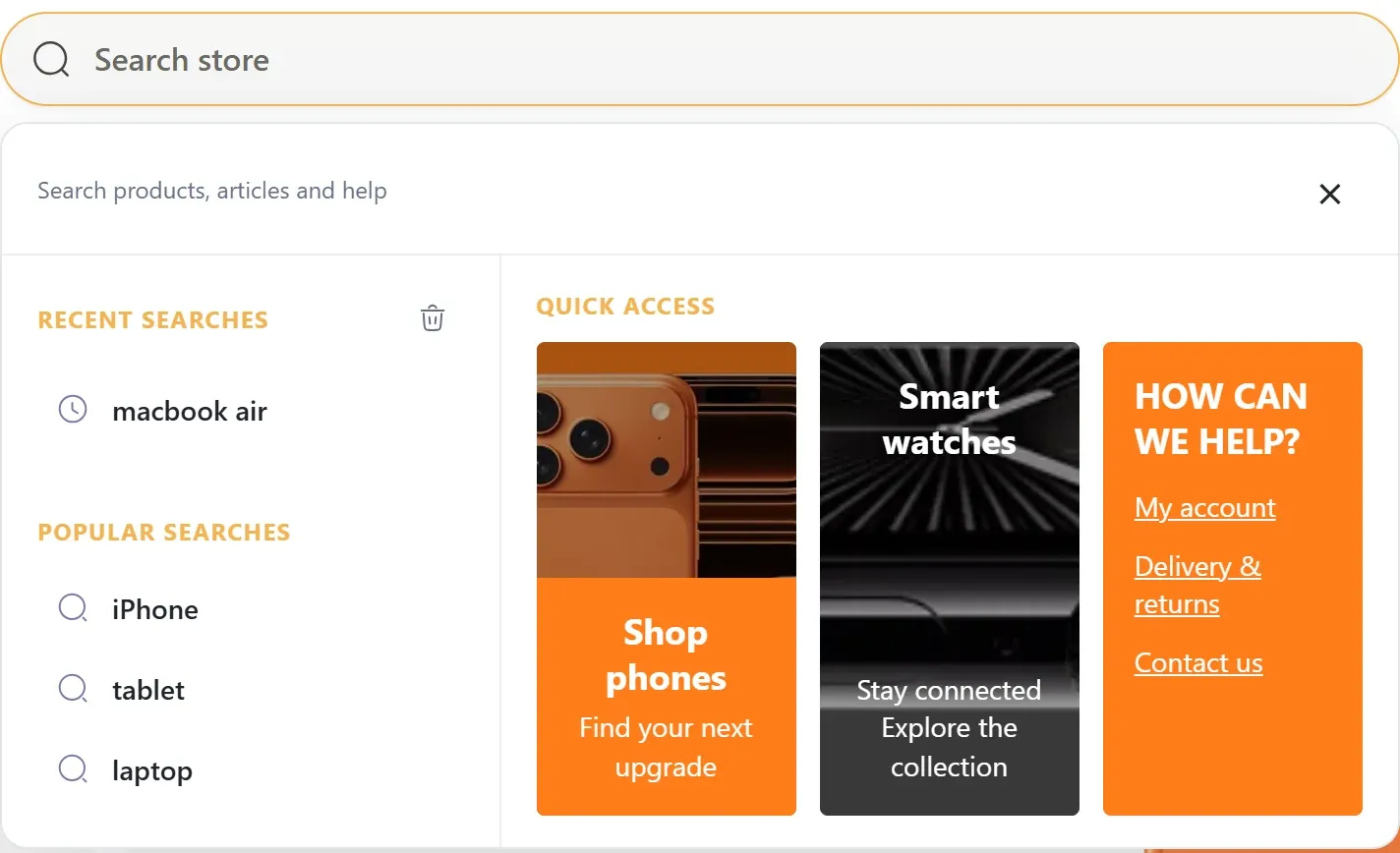
A search panel that helps before the first keystroke
Opening the search box shows recent and popular searches with three visual quick-access cards. As the shopper types, matching categories and product previews appear.
- Recent searches stay in the shopper’s own browser
- Popular terms and quick-access cards are set by you
- Product previews use live nopCommerce prices
TechOrbit demo store
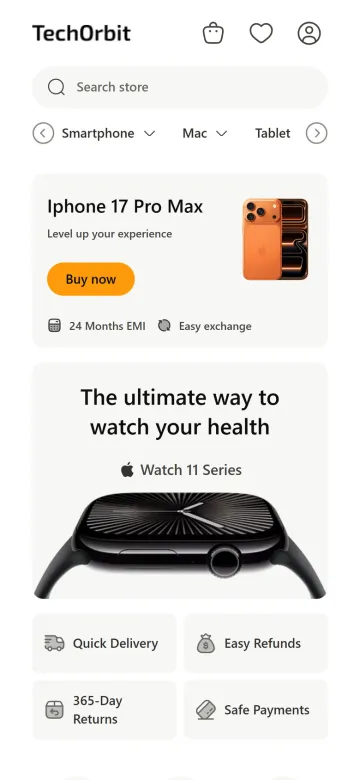
The same store, arranged for a phone
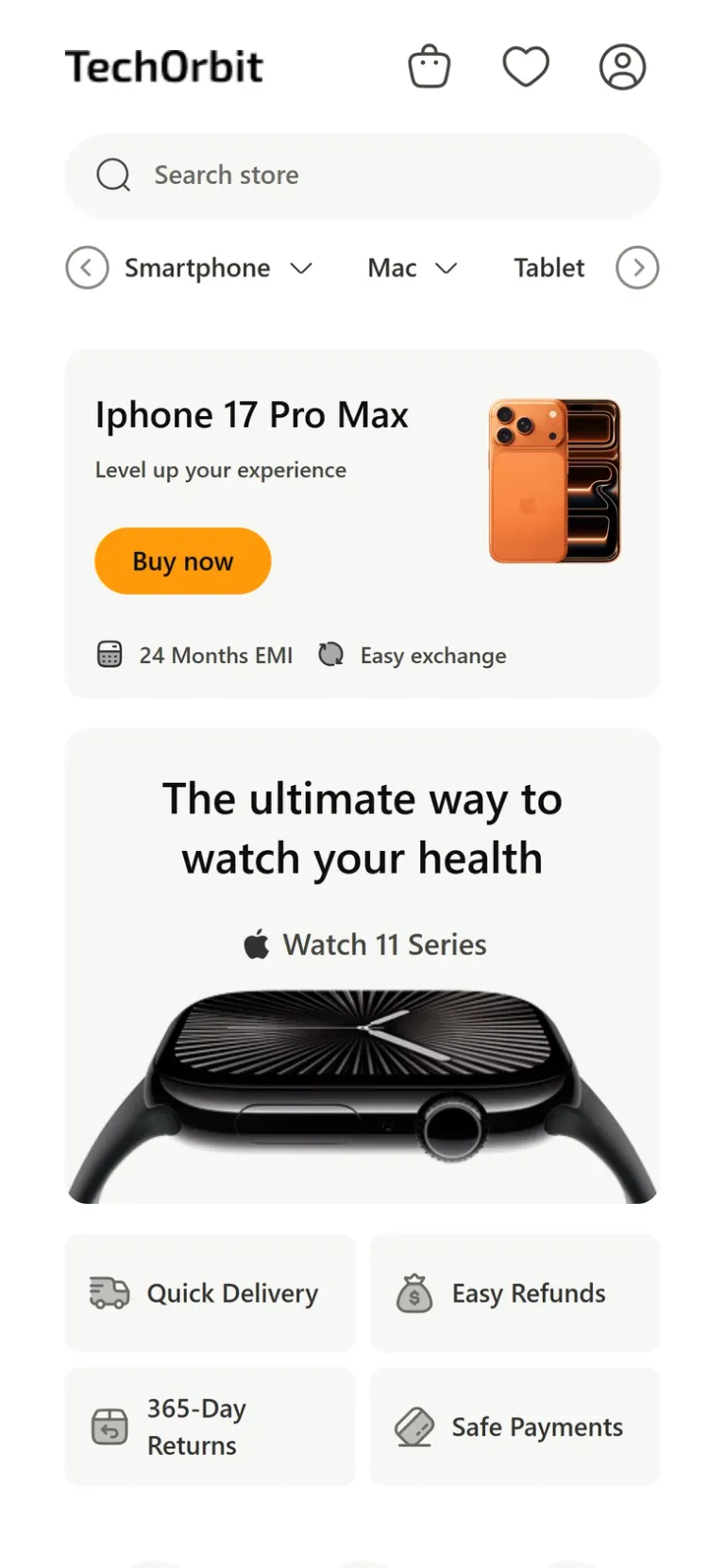
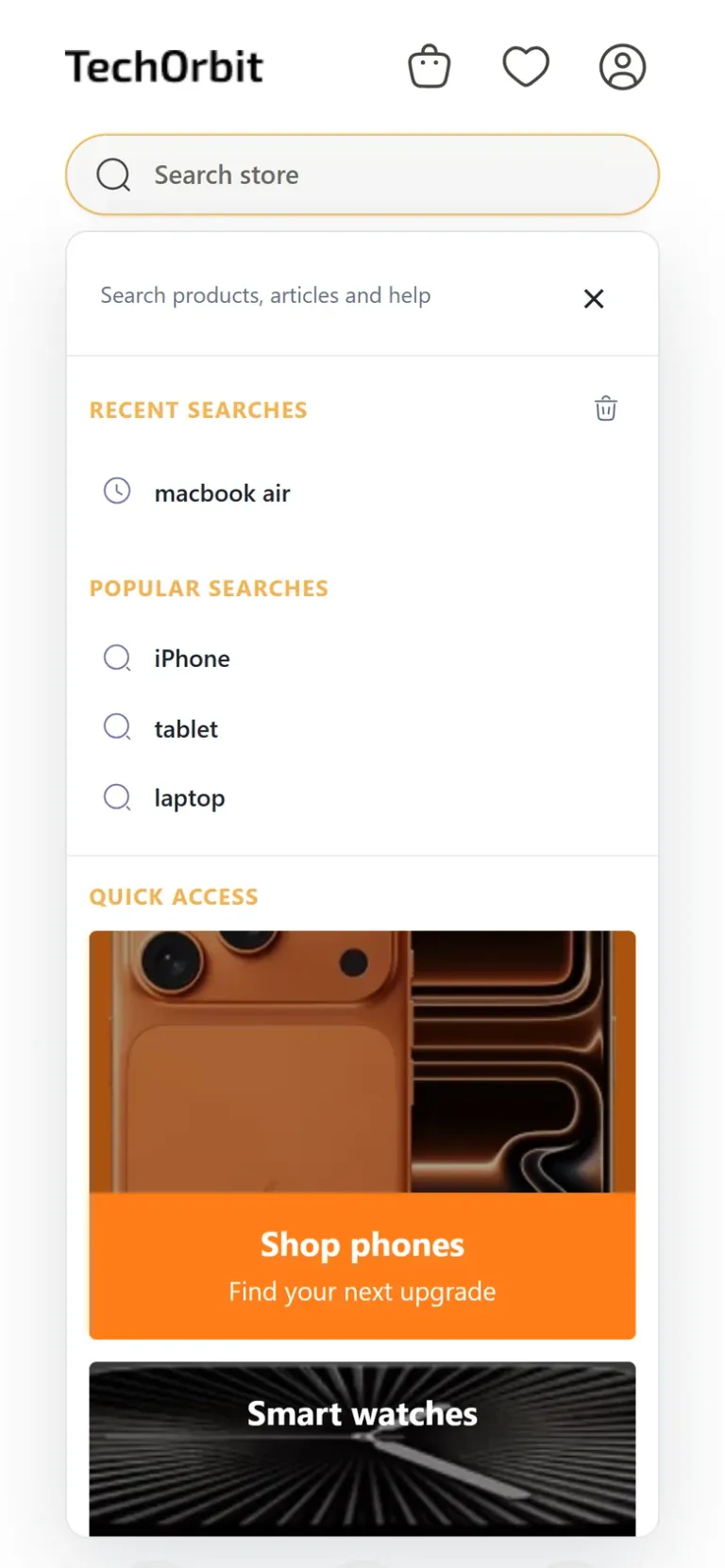
On small screens the search box gets its own full-width row, the category menu scrolls sideways, and hero cards and search results stack into one column.
- Full-width search box at the top of the page
- Horizontally scrolling category menu
- Search panel and quick-access cards fit the phone’s width
Change supported homepage sections from admin
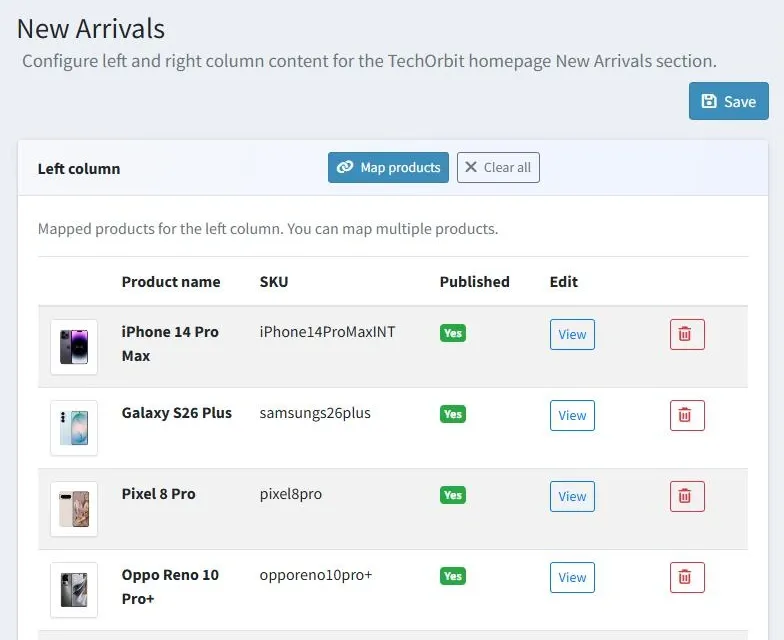
TechOrbit Theme Manager adds TechOrbit pages to nopCommerce admin. Here, the new-arrivals list is built by picking catalog products, which then show with their live names, images and prices.
- Product picker instead of typed product IDs
- Published status shown for each mapped product
- No template edits for supported sections
Advanced Search
Search that guides shoppers before they finish typing
Electronics catalogs are full of near-identical names. Cartenvo Advanced Search opens a two-column panel under the search box that points shoppers to the right category, product or help page.
1 Before typing
- Recent searches
- The shopper’s last few searches, kept only in their own browser. They can clear them with one click.
- Popular searches
- Terms you choose, such as “iPhone”, “tablet” or “laptop”, in the order you set.
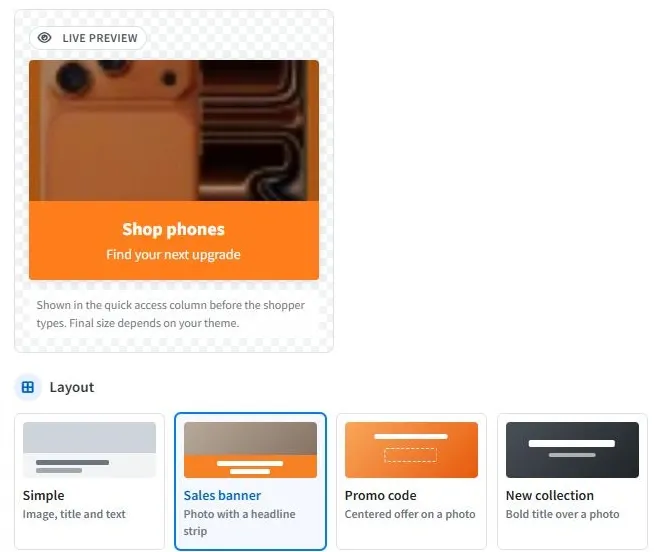
- Three quick-access cards
- Visual shortcuts you design: here a phone card with an orange headline strip, a watch card with overlaid text, and an orange help card with account, delivery and contact links.
2 While typing
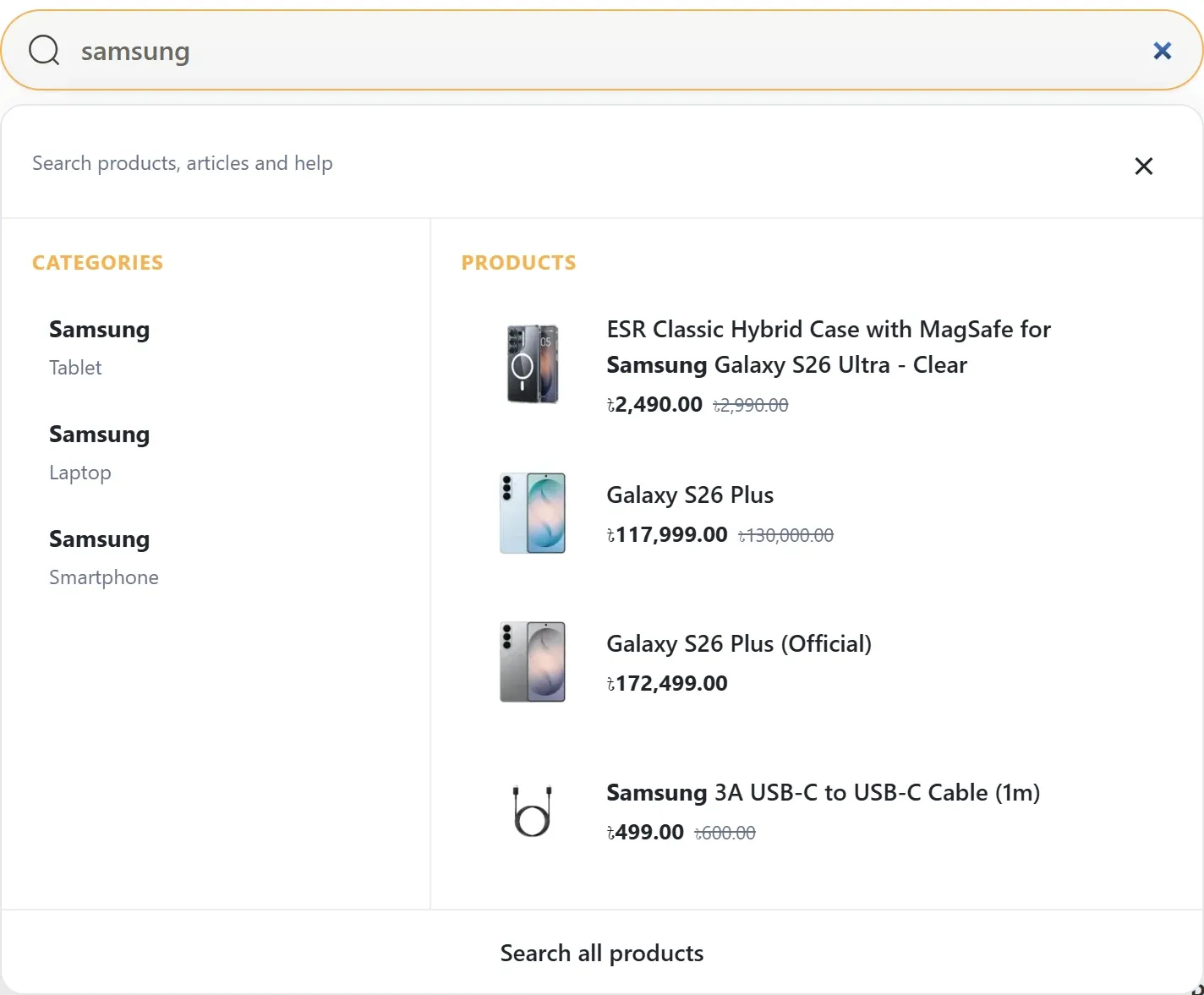
- Categories
- Matching categories with their parent path, so three “Samsung” categories under Smartphone, Tablet and Laptop stay distinct.
- Product previews
- Images, names and prices from nopCommerce, using the shopper’s currency, tax settings and permissions.
- Optional sections
- Query suggestions, brands, help and FAQs and blog articles can be switched on, plus popular categories when nothing matches.
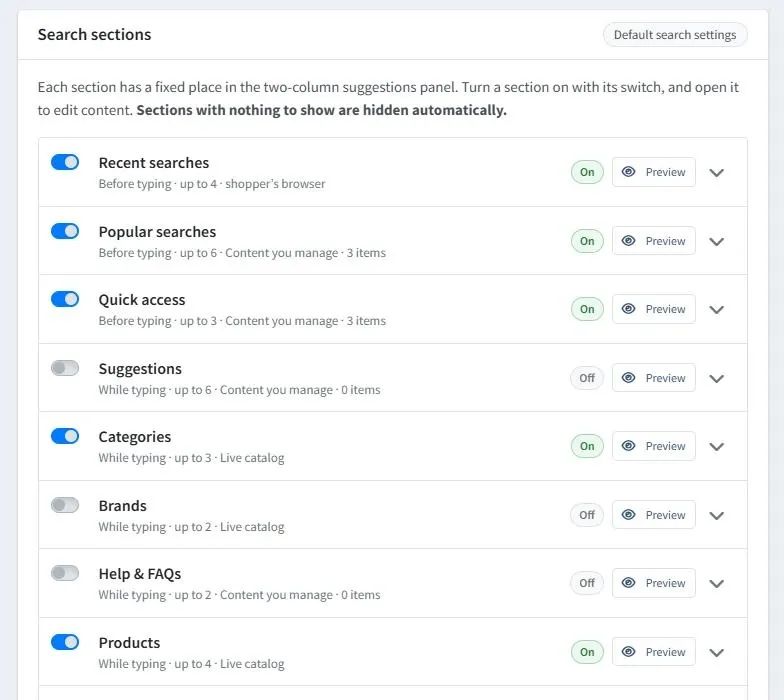
You decide what the panel shows
One admin page lists all ten search sections, from recent searches to a no-results fallback.
- Switch each section on or off
- Set each section’s heading and how many items it shows
- Add popular terms, quick-access cards and FAQs with their own images and links
- Design quick-access cards from six layouts with a live preview
- Open a Preview for any section to see where it sits in the panel
Each section has a fixed position in the panel. Sections with nothing to show are hidden automatically.
Two search providers, one panel
Default nopCommerce search
Searches your store’s own catalog directly. No external account, keys or extra fees. This is how the demo store runs.
Algolia (optional)
Uses your own Algolia account. The plugin can keep your catalog synchronized with Algolia automatically. Algolia’s subscription and usage charges are billed by Algolia, not included in the purchase.
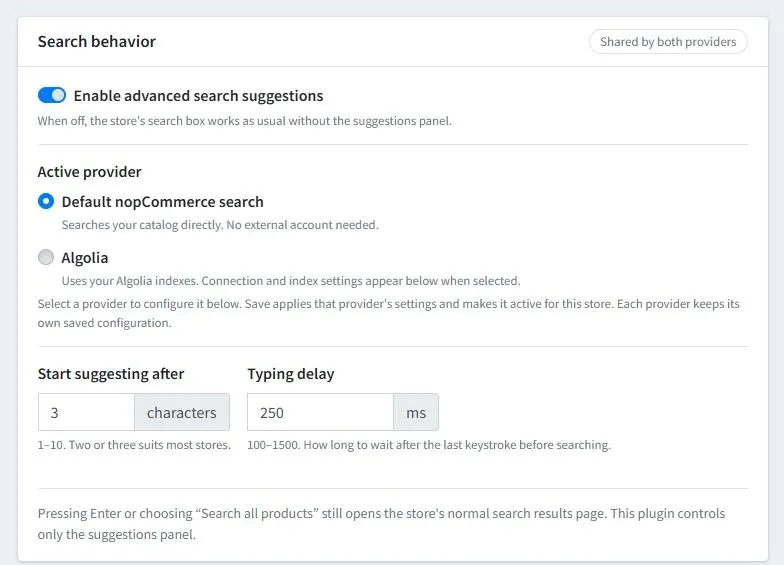
Algolia synchronization has not yet been validated against a live Algolia account. Pressing Enter or choosing “Search all products” still opens your store’s normal search results page.
Running a different theme? Read more about Cartenvo Advanced Search for nopCommerce, also sold on its own.
Theme Manager
Update the homepage without touching code
The included TechOrbit Theme Manager plugin adds TechOrbit pages to nopCommerce admin for these sections:
Hero feature cards
Turn the section on or off. Set the main card’s title, subtitle, button text and link, image and two feature labels, plus the second card’s title, link and image.
New arrivals
Pick catalog products for the list with a product picker, and choose the spotlight product with optional custom image, text, button label and link.
Promo cards
Show or hide the section and each of the two cards, with their own title, image, alt text, button text and link.
Special offers
Choose which catalog products appear in the special-offers grid.
Category banners
Give any category its own banner image and formatted banner text.
Benefits strip
Add, edit, delete or switch off benefit items, each with a title, description and optional SVG icon.
Testimonials and statistics
Add customer quotes with name, photo and rating, plus value-and-label statistic cards. Each section has its own heading and visibility switch, and stays hidden until you fill it in.
Store content
Set the footer description and public contact email, and edit or hide the delivery, refund and payment notes shown on product pages.
Section headings such as “Popular items” and “Brands We Love”, and the newsletter banner, are part of the theme templates. Brand logos come from your published manufacturers, and the newsletter uses nopCommerce’s own subscription and confirmation emails.
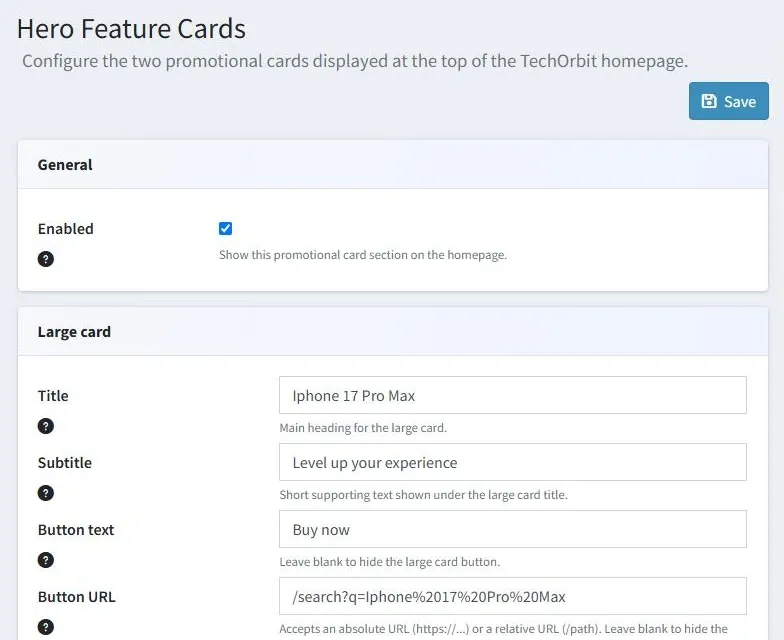
The Hero Feature Cards page in nopCommerce admin.
Pricing
One price per store, with a year of updates
Here’s what the licence includes and what you arrange separately.
What’s included
TechOrbit Electronics Theme
Storefront templates and styles for the homepage, catalog, search, product, cart, checkout and account pages.
TechOrbit Theme Manager
Required companion plugin. Adds the TechOrbit admin pages for homepage sections, category banners and store content.
Cartenvo Advanced Search
The search suggestions plugin shown in the demo, with default nopCommerce search built in and optional Algolia.
Installation guide
Step-by-step installation, configuration, upgrade and rollback instructions.
12 months of updates and support
New releases for nopCommerce 4.90 and answers to questions about the theme and its plugins.
Not included
- Installation, design changes and custom development
- Hosting and your nopCommerce server
- Payment provider fees
- Algolia subscription and usage charges, if you use Algolia
- A nopCommerce copyright-removal licence
Need help installing or adapting TechOrbit? Cartenvo’s nopCommerce development services are quoted separately.
Read the full licence and refund terms and the installation guide.
Introductory price
USD
$149.00per store licence
Planned standard price after the introductory period: $199.00.
- One production store, plus its staging and development environments
- 12 months of updates and 12 months of product support
- Optional renewal: $79.00 per year, arranged by email
- Your purchased version keeps working after updates and support end
Purchasing opens soon
Online checkout isn’t available yet, so there’s nothing to pay today. Explore the live demo in the meantime.
Compatibility
Check the fit before you buy
The practical details for your store and team.
- nopCommerce
- Version 4.90 on .NET 9. Earlier and later versions are not supported.
- Release
- Version 4.90.2. One ZIP installs the theme and both plugins through nopCommerce’s Upload plugin or theme.
- Required plugin
- TechOrbit Theme Manager. Without it, the managed homepage sections don’t appear.
- Search provider
- Advanced Search uses default nopCommerce search out of the box. Algolia is optional and needs your own account.
- Languages
- Storefront text is in English. Many theme labels are written in the templates rather than nopCommerce language resources, and Theme Manager content has one version for all languages, so translating the store needs template edits.
- Right-to-left
- Not supported. TechOrbit is not suitable yet for Arabic, Hebrew or other RTL storefronts.
- Multi-store
- Theme Manager settings are shared by every store in the installation. Product visibility and catalog store restrictions are respected.
- Before installing
- A nopCommerce 4.90 store, an administrator account that can upload plugins and themes, and the ability to restart the application.
- Updates and support
- 12 months from purchase, renewable for $79.00 a year by email. Support covers the theme and its plugins, not custom development. Contact contact@cartenvo.com.
- Documentation
- Read the installation guide
Questions
Before you buy
Something else to check? Ask Cartenvo.
Does TechOrbit require Algolia?
No. Cartenvo Advanced Search, included with TechOrbit, works with nopCommerce’s default search and your live catalog, with no Algolia account. Algolia is an optional provider that needs your own Algolia account and keys, and Algolia bills its subscription and usage separately.
What comes with the theme?
One ZIP that installs the TechOrbit Electronics Theme, the TechOrbit Theme Manager plugin and the Cartenvo Advanced Search plugin, plus installation documentation and 12 months of updates and product support.
Can I manage homepage content from admin?
Yes. TechOrbit Theme Manager covers the hero cards, new arrivals, promo cards, special offers, category banners, benefits strip, testimonials, statistics, footer description and contact email. Section headings such as “Popular items” and “Brands We Love” are part of the theme templates.
Can I change search sections?
Yes. Each of the ten search sections can be switched on or off and given its own heading and maximum number of items. Curated items such as popular terms, quick-access cards and FAQs take their own images and links. Section positions in the panel are fixed.
Can I use it on staging?
Yes. One licence covers one production store plus its staging and development environments.
What happens when support expires?
The version you bought keeps working, and releases published during your 12 months stay available to download. To keep receiving updates and support, you can renew for $79 a year; we arrange renewals by email.
Are installation and customization included?
No. The purchase covers the theme and its plugins, with an installation guide. Installation, design changes and custom development are separate services you can ask Cartenvo to quote for.
Which nopCommerce versions are supported?
nopCommerce 4.90 on .NET 9. Other versions are not supported.
Does the theme include payment processing for my store?
No. TechOrbit styles nopCommerce’s checkout pages, but your customers pay through whichever payment plugin and provider you set up in nopCommerce, and that provider’s fees are separate.
How do I pay, and how do I get the download?
Checkout is handled by Paddle, our reseller, which accepts the payment and issues the receipt. After the payment is confirmed you can sign in to My purchases with the same email address to download TechOrbit.
What is the refund policy?
TechOrbit is a digital download, so purchases are not refundable except where the law or Paddle’s buyer terms give you a right to a refund. A refund ends access to downloads for that purchase. The licence terms have the details.
Ready to see TechOrbit with your catalog in mind?
Explore the demo store, review pricing, or ask us anything about the theme.