- Plugin
- Paid
Integration Hub Pro: nopCommerce webhooks your ERP can use
A paid add-on to the free Integration Hub plugin. Each webhook gets only the events it needs, in the receiver’s own format. Your ERP, warehouse or accounting system can push stock, prices, order statuses and shipments back through signed inbound webhooks. And you hear about problems in Slack, Teams or by email before customers do.
- nopCommerce
- 4.80, 4.90, 5.00
- Needs
- Free plugin, release 4+
- Price
- Price at launch
- Licence
- Per store domain
Integration Hub → Pro → Filters and payloads
Integration Hub Pro
Price at launch
Licence for one store domain and its subdomains. Development addresses need no licence.
Purchasing opens soon
Pro is finished and tested on nopCommerce 4.80, 4.90 and 5.00. Online checkout isn’t open yet, so there’s nothing to pay today. Email us for early access and we’ll send the package and a licence.
New to the Integration Hub? Start with the free plugin’s webhooks and sync API guides.
What Pro adds
The free plugin connects your store. Pro makes it fit your systems.
Everything Pro does runs inside nopCommerce, on the same signed webhooks and sync API the free plugin already provides.
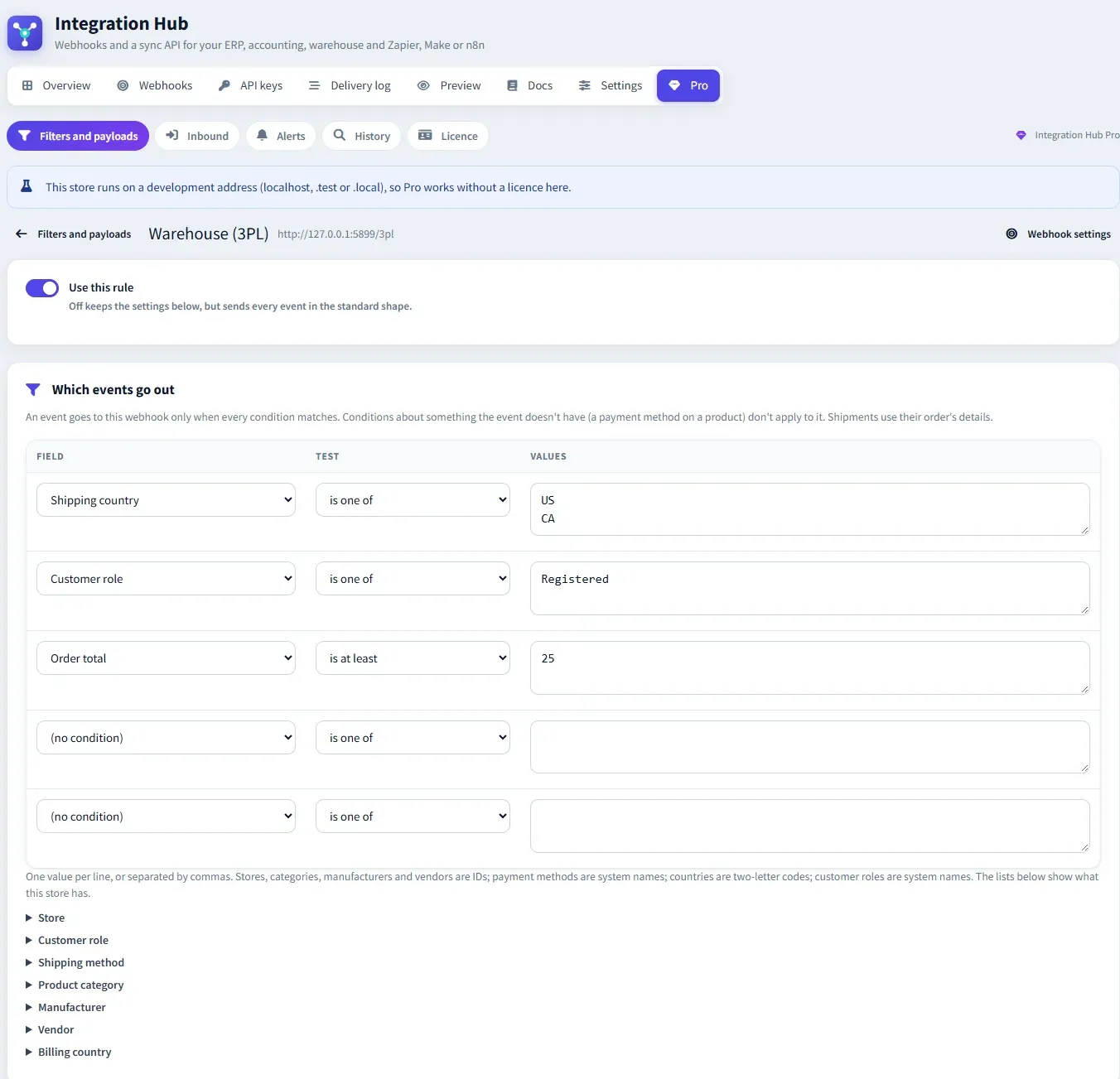
Only the events each system needs
Conditions per webhook on the store, order total, payment and shipping method, billing and shipping country, customer role, product category, manufacturer and vendor. Every condition must match.
shipping country is one of US, CAPayloads in the receiver’s format
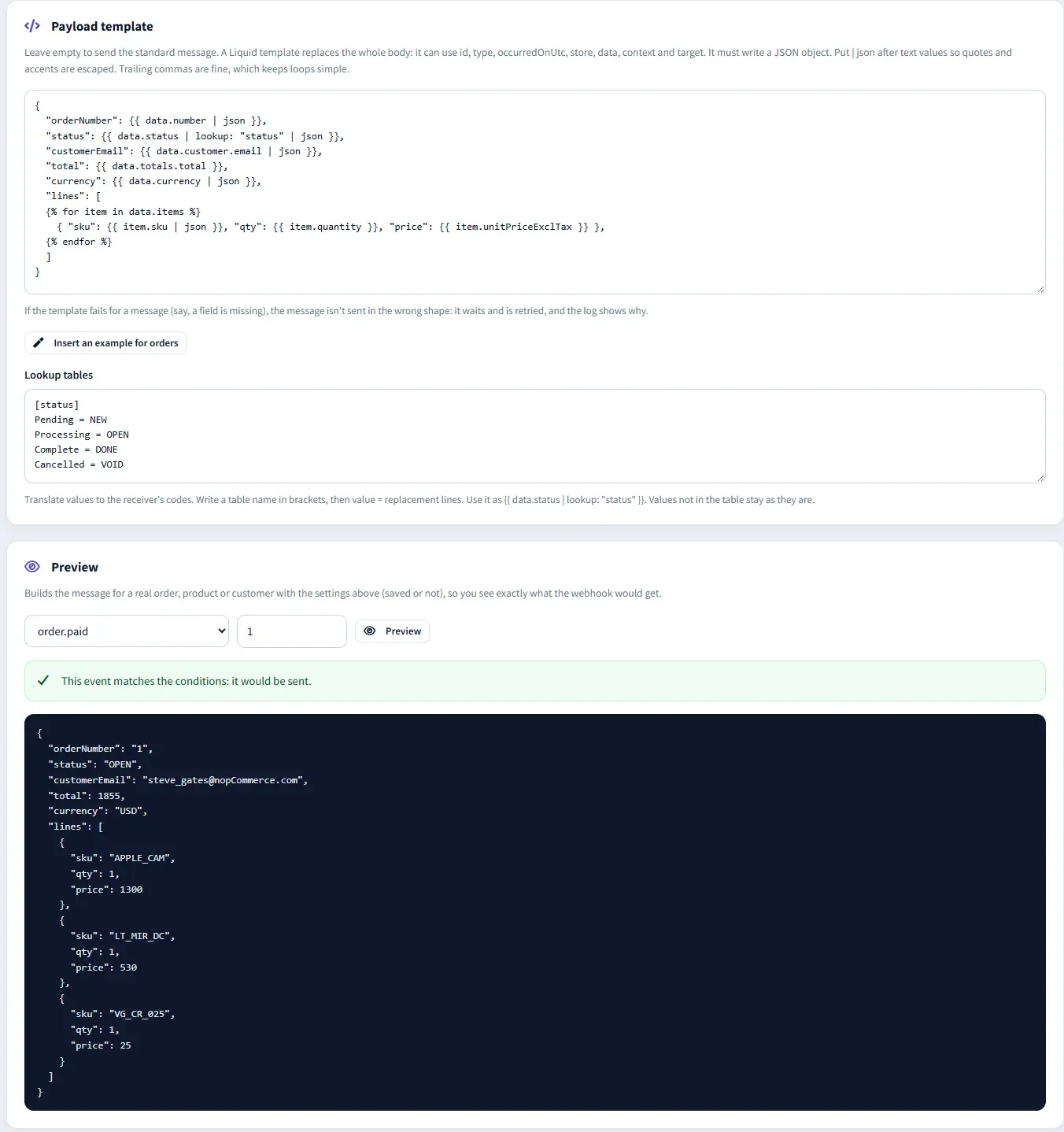
A Liquid template replaces the whole body, with lookup tables that turn store values into the receiver’s codes. Preview it on a real order, product or customer before you save.
{{ data.status | lookup: "status" | json }}Never the wrong shape
If a template fails for a message, the message isn’t sent in the standard shape. It waits, is retried on the normal schedule, and the log says why. Fix the template and the waiting messages go out.
held · retried · sent in orderInbound webhooks from your ERP
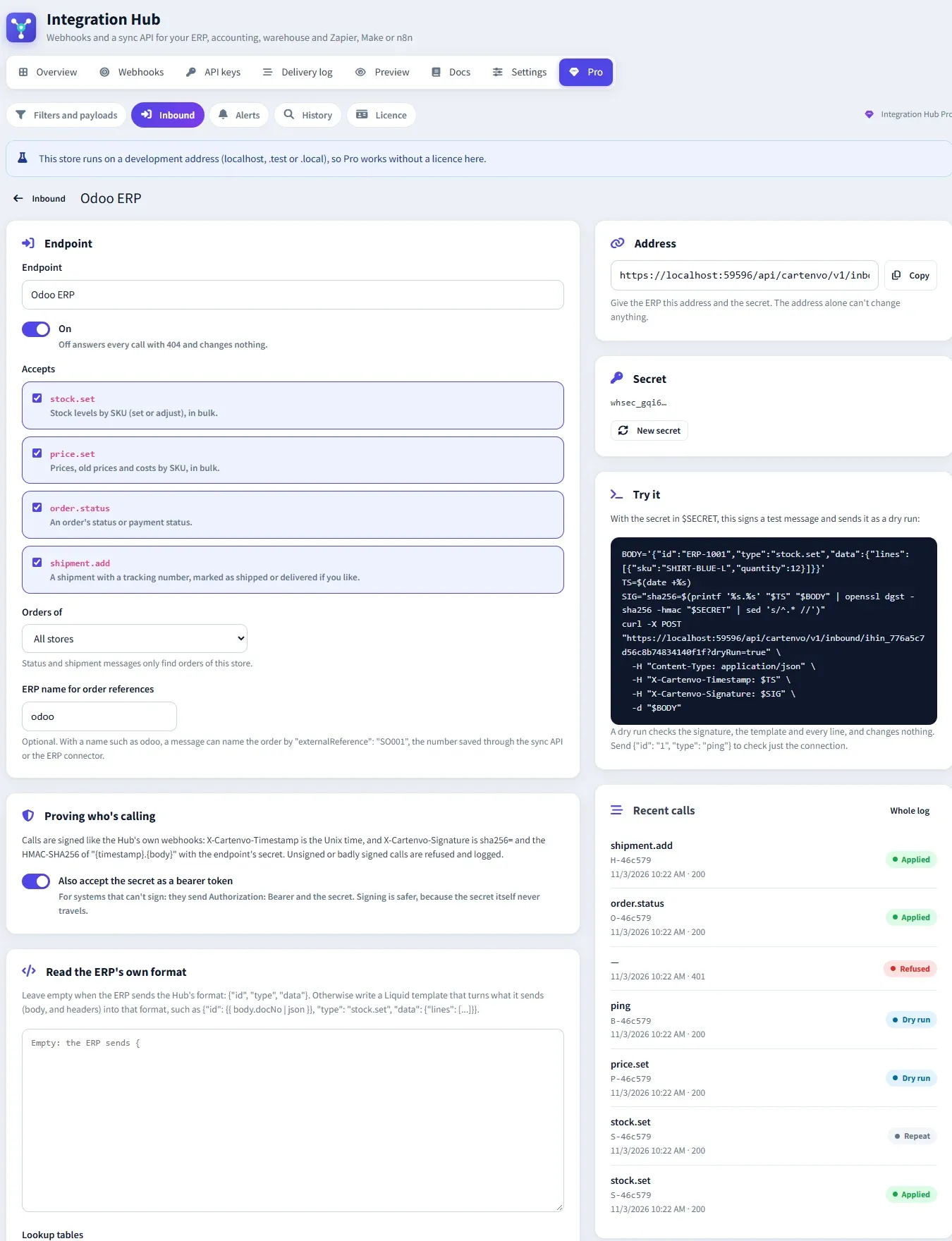
Signed endpoints for stock.set, price.set, order.status and shipment.add. Each message ID is applied once, dry runs change nothing, and a Liquid template can read the ERP’s own JSON.
POST /api/cartenvo/v1/inbound/ihin_…Alerts by email, Slack and Teams
When a webhook fails several attempts in a row (and when it recovers), when an API key is used from a new address, when inbound calls keep being refused, and when stock stops syncing.
5 failures in a row → SlackA year of delivery history
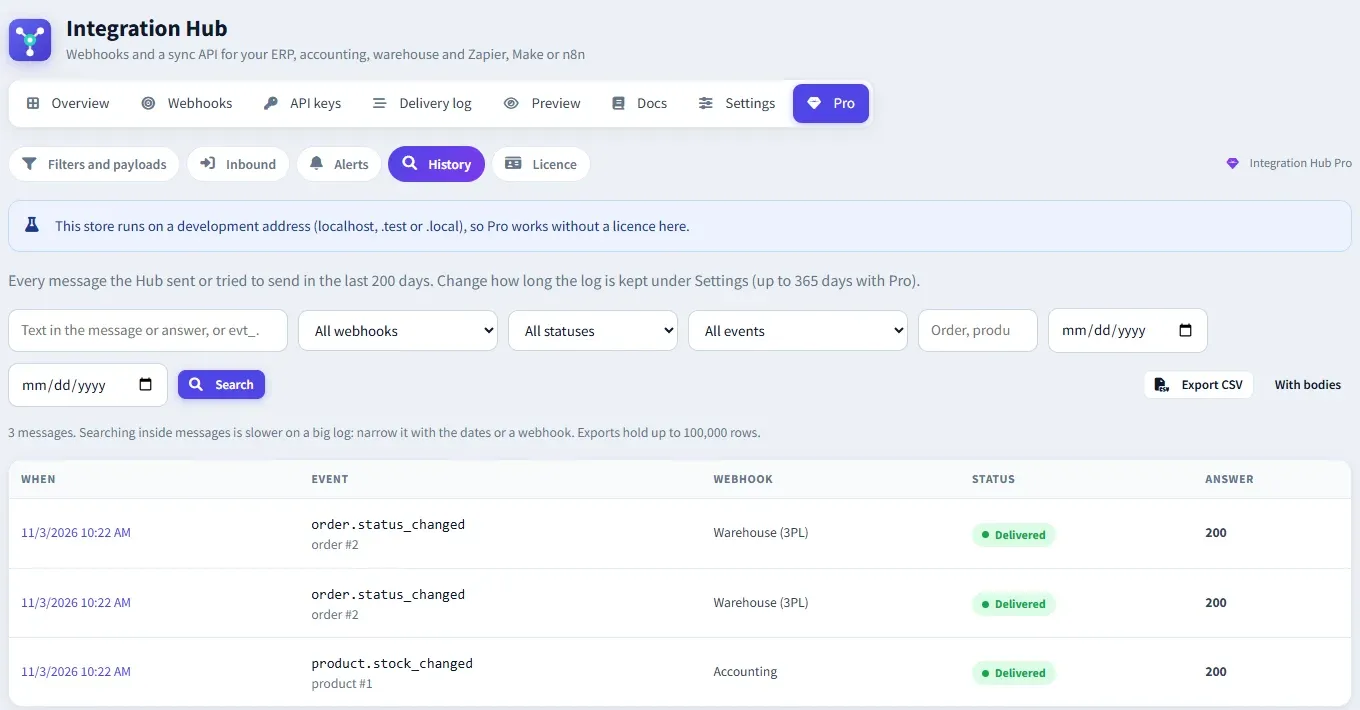
Keep the delivery log for up to 365 days instead of 90. Search inside messages, answers and errors, by event ID, webhook, status, event, entity and dates, and export up to 100,000 rows as CSV.
evt_… · Export CSV
Integration Hub → Pro → Filters and payloads → Template
Inbound webhooks
Let the ERP update the store.
Give each system its own endpoint and secret, choose the message types it may send, and limit it to one store if you like. Every call is logged with the body received and the answer sent.
Send the warehouse only what it ships
A 3PL gets paid orders shipped to its countries, in its own JSON with its own status codes, and nothing else.
Keep stock right without a middleman
The ERP posts stock levels by SKU straight to the store. A repeated message ID is answered once, so retries are safe.
Close the order loop
The ERP marks orders as processing or complete and adds shipments with tracking numbers, naming orders by ID, number or its own reference.
Know before customers do
A failing webhook pings Slack or Teams after a few attempts instead of after its last retry, and again when it works.
Integration Hub → Pro → Inbound
Find any message, a year later
With Pro the delivery log can be kept for up to 365 days. Search it by text inside the message, the answer or the error, or by event ID, and hand the results to accounting or support as CSV.
Integration Hub → Pro → History
Free and Pro
The free Integration Hub plugin is free to use on any number of stores, with no limits. Pro only adds to it, and installing or removing Pro never changes what the free plugin does.
| Feature | Free plugin$0Free on any number of storesRead the free plugin docs | ProPrice at launchearly access by emailEarly access |
|---|---|---|
| Webhooks out of the store | ||
| Signed webhooks for orders, shipments, products, stock, customers and more | Included | Included |
| Retries, delivery log and resend | Included | Included |
| One store per webhook | Included | Included |
| Conditions on totals, payment, shipping, countries, roles, categories and vendors | Not included | Included |
| Liquid payload templates and lookup tablesWith a preview on real data | Not included | Included |
| Changes back into the store | ||
| Sync API with API keysStock, prices, order statuses, shipments, changes feed | Included | Included |
| Inbound webhooks the ERP posts toSigned, applied once per ID, dry runs, full log | Not included | Included |
| Read the ERP’s own JSON with a template | Not included | Included |
| Monitoring | ||
| Email when a message fails every attempt | Included | Included |
| Alerts after failures in a row, and on recovery | Not included | Included |
| Slack and Microsoft Teams | Not included | Included |
| New address for an API key, refused inbound calls, stale stock | Not included | Included |
| Delivery log kept for | Up to 90 days | Up to 365 days |
| Search inside messages and CSV export | Not included | Included |
| Licence | ||
| nopCommerce 4.80, 4.90 and 5.00 | Included | Included |
| Try before you pay | Always free | Free on development addresses |
| Support | By email | By email |
How the licence works
- One licence covers one store domain and its subdomains. “www.” is ignored.
- Checked offline inside nopCommerce, against each store’s domain. Pro never calls home.
- Works without a licence on localhost and .test or .local addresses, for development and staging.
- Without an active licence Pro changes nothing: webhooks get every event in the standard shape, inbound endpoints answer 403, alerts stop and the log limit goes back to 90 days. Your settings are kept.
- A licence keeps working for 14 days after its expiry date.
Install in four steps
- 1 Install the free Cartenvo Integration Hub plugin, release 4 or later.
- 2 Upload the Integration Hub Pro ZIP in Configuration → Local plugins, install it and restart. One package covers 4.80, 4.90 and 5.00.
- 3 Open Configuration → Integration Hub → Pro. Add conditions and a template to a webhook, or an inbound endpoint for your ERP.
- 4 Paste your licence under Pro → Licence. Filters, templates, inbound endpoints and alerts then work on the live store.
Every setting is explained in the Integration Hub Pro guide, including the inbound message types and the answers the store sends.
Frequently asked questions
What does Integration Hub Pro need?
nopCommerce 4.80, 4.90 or 5.00 and the free Cartenvo Integration Hub plugin, release 4 or later. Pro uses only the free plugin’s public hook points, so it adds to the free plugin without changing it.
Can I try it before buying?
Yes. On localhost and .test or .local addresses Pro works fully without a licence, so you can set up filters, templates and inbound endpoints on a copy of your store and test them with your ERP first.
How is an inbound webhook protected?
Each endpoint has its own address and secret. Calls are signed like the Hub’s own webhooks, with an HMAC-SHA256 of the timestamp and body, and a timestamp more than 5 minutes off is refused. Calls must use https. For systems that can’t sign, an endpoint can accept the secret as a bearer token instead.
What if the ERP sends the same message twice?
A message ID that was already applied isn’t applied again. The store answers with the first answer and the header X-Cartenvo-Duplicate: true, so the ERP can retry safely. A rejected message can be sent again with the same ID once it’s fixed.
What happens when a template has a mistake?
That message isn’t sent in the standard shape. It counts as a failed attempt, is retried on the normal schedule, and the delivery log shows the error. Fix the template and the waiting messages go out in order.
Does Pro send my data anywhere?
No. The licence is checked inside the store and Pro never calls home. Webhooks go only to the addresses you add, and alerts only to the email addresses, Slack and Teams channels you choose.
Want Integration Hub Pro on your store?
Purchasing opens soon. Email us for early access, or tell us which ERP, warehouse or accounting system you want to connect to nopCommerce.