- Plugin
- Paid
Merchant Center Pro: better Google Shopping ads for nopCommerce
A paid add-on to the free Merchant Center Feed plugin. It fills Google Ads custom labels from your store data, so campaigns can bid by profit margin, price, best sellers and stock. It builds clearer product titles from templates, and shows which products Google showed, which got clicks and which cost more than in other shops.
- nopCommerce
- 4.80, 4.90, 5.00
- Needs
- Free plugin, release 3+
- Price
- $99 one-time
- Licence
- Per store domain
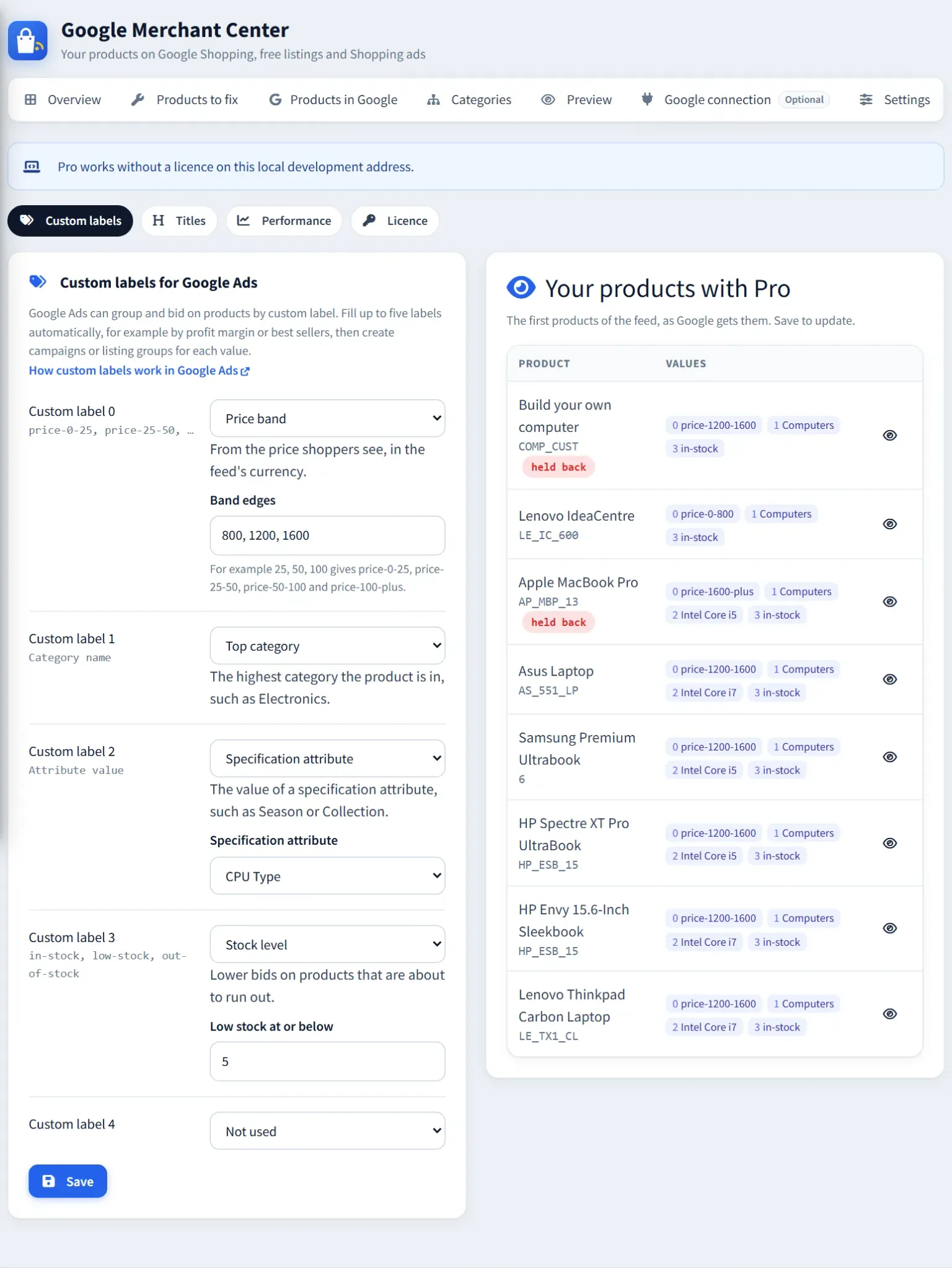
Merchant Center → Pro → Custom labels
Merchant Center Pro
$99one-time
Lifetime licence for the domain and its subdomains, with 12 months of updates and support.
Purchasing opens soon
Pro is finished and tested on nopCommerce 4.80, 4.90 and 5.00. Online checkout isn’t open yet, so there’s nothing to pay today. Early-access customers pay $49 once, for a lifetime licence.
New to Google Shopping on nopCommerce? Read the Google Shopping feed guide.
What Pro adds
The free plugin gets your products into Google. Pro helps them sell.
Everything Pro does runs inside nopCommerce, on the same feed file or Merchant API sync the free plugin already sends.
Custom labels, filled for you
Up to five Google Ads custom labels from your store data: profit margin from product cost, price band, best sellers by units sold, stock level, new arrivals, top category, any specification attribute, or fixed text.
margin-high · price-100-250 · bestsellerTitle rules
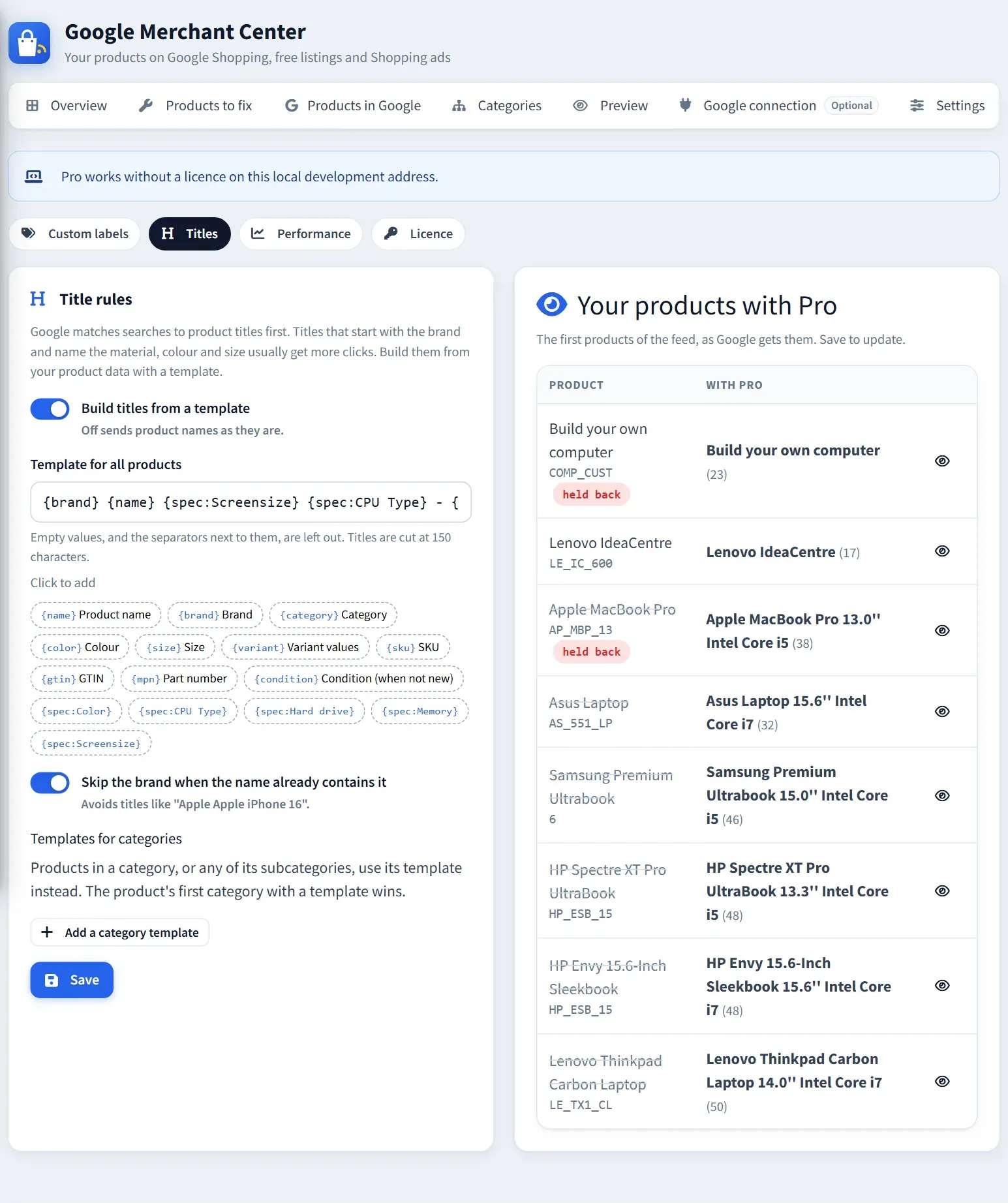
Titles built from a template such as {brand} {name} {spec:Material} - {variant}, with a different template per category if you like. Empty values and their separators drop out, and titles stop at Google’s 150 characters.
{brand} {name} {spec:Screensize}Performance in Google
Impressions, clicks, click rate, conversions and conversion value per product for the last 30 days, read from Merchant Center once a day. Lists of the most clicked products and of products Google showed that nobody clicked.
impressions · clicks · click ratePrices against other shops
Google’s price benchmark for each product, a list of products that cost more than elsewhere, and two more label types: “Clicks in Google” and “Price vs. other shops”, so campaigns can push the products that win.
top-clicks · price-belowFacebook & Instagram catalog
A Meta catalog of the same products that keeps itself up to date, for ads that show shoppers what they viewed and for shops on Facebook and Instagram. IDs match nopCommerce’s Facebook Pixel plugin, and a step-by-step setup checks your products first.
Commerce Manager · Facebook PixelMicrosoft Shopping
A feed for Microsoft Merchant Center and shopping ads on Bing, with your custom labels and titles and links tagged for Bing. Or a guided import from Google Merchant Center, if you prefer.
utm_source=bing · custom labels
Merchant Center → Pro → Titles
Why custom labels
Spend your ad budget where it earns.
Google Ads can only bid differently on groups it can see. Custom labels are how you tell it which products are which.
Bid more on what earns more
Group products by margin-high, margin-medium and margin-low, and give the high-margin group a higher target in Google Ads.
Stop paying for empty shelves
Lower bids on low-stock products before they run out, and keep out-of-stock items out of campaigns.
Push what already sells
Best sellers by units sold in your store get their own listing group, so they don’t compete with slow movers for budget.
Fix products nobody clicks
Products Google showed many times without a click usually need a better title, picture or price. Pro lists them.
Free and Pro
The free plugin is open source under the Apache 2.0 licence and stays free, with no limits. Pro only adds to it, and installing or removing Pro never changes what the free plugin does.
| Feature | Free plugin$0Open source, Apache 2.0Get the free plugin | Pro$99one-time, per store · $49 early accessEarly access |
|---|---|---|
| Get products into Google | ||
| Product feed fileA link Merchant Center reads on a schedule | Included | Included |
| Automatic sync through the Merchant APIChanged products sent within minutes | Included | Included |
| Checks before sendingMissing pictures, prices and GTINs, with a list to fix | Included | Included |
| Google categories and variants | Included | Included |
| Products in GoogleApprovals and Google’s own issues, read back | Included | Included |
| Sell more with Google Ads | ||
| Custom labels filled automaticallyMargin, price band, best sellers, stock, new arrivals and more | Not included | Up to 5 |
| Title templatesBrand, specifications and variant in every title | Not included | Per category |
| Clicks, impressions and conversions per product | Not included | Last 30 days |
| Google’s price benchmarkProducts that cost more than in other shops | Not included | Included |
| More channels | ||
| Facebook & Instagram catalogIDs match nopCommerce’s Facebook Pixel plugin | Not included | Included |
| Microsoft Shopping feedOr a guided import from Google | Not included | Included |
| Step-by-step setup with product checks | Not included | Included |
| Licence and support | ||
| nopCommerce 4.80, 4.90 and 5.00 | Included | Included |
| Try before you pay | Always free | Preview without a licence |
| Updates | On GitHub | 12 months, renewable |
| Support | GitHub issues | By email |
How the licence works
- One licence covers one store domain and its subdomains. “www.” is ignored.
- Checked offline inside nopCommerce. Pro never calls home.
- Works without a licence on localhost, 127.0.0.1 and .test or .local addresses, for development and staging.
- A lifetime licence: pay $99 once, or $49 with early access. It never expires.
- Includes 12 months of updates and email support. After that Pro keeps working; renew by email for newer versions.
- Without a licence, every Pro page still shows your own products before and after, so you can see the result first.
Install in four steps
- 1 Install the free Merchant Center Feed for Google plugin, release 3 or later, and create a feed.
- 2 Upload the Merchant Center Pro ZIP in Configuration → Local plugins, install it and restart. One package covers 4.80, 4.90 and 5.00.
- 3 Open Promotions → Google Merchant Center → Pro, choose your labels and title template, and check the preview.
- 4 Add your licence under Pro → Licence. The next feed or sync sends the new labels and titles to Google.
The free plugin’s source, set-up steps and changelog are on GitHub (opens in a new tab).
Frequently asked questions
What does Merchant Center Pro need?
nopCommerce 4.80, 4.90 or 5.00 and the free Merchant Center Feed for Google plugin, release 3 or later. Labels and titles work with a feed file or with automatic sync. Performance and price benchmarks need the free plugin connected to Google; feed files work for that too.
Can I try it before buying?
Yes. Install it and each Pro page shows the first products of your feed before and after, without a licence. It also runs fully on localhost and .test or .local addresses, so you can try it on a copy of your store.
What are Google Ads custom labels?
Five free-text fields, custom_label_0 to custom_label_4, that Google Ads uses to split Shopping and Performance Max campaigns into groups with their own bids. Google doesn’t show them to shoppers. Pro fills them from your nopCommerce data, so the groups stay correct as prices, stock and sales change.
Why doesn’t the price comparison show?
Google only shares its price benchmark when Market insights is turned on for the Merchant Center account (Growth → Manage programs). Without it, Pro still reads impressions, clicks and conversions, and says how to turn it on.
Is the licence a subscription?
No. You pay once and the licence never expires, so Pro keeps working on your store. It includes 12 months of updates and email support, and releases published in that time stay downloadable. For later versions and support after that, renew by email.
Does Pro send my data anywhere?
No. The licence is checked offline. Labels and titles go to Google only through your own feed or Merchant API connection, and performance is read from your own Merchant Center account.
Want Merchant Center Pro on your store?
Purchasing opens soon. Email us for early access at $49 instead of $99, a one-time price for a lifetime licence, or ask us about your Google Shopping feed.